<?xml version="1.0" encoding="utf-8"?>
<feed xmlns="http://www.w3.org/2005/Atom">
    <id>https://revisit.dev/PR232/blog/</id>
    <title>Home | ReVISit Blog</title>
    <updated>2026-04-30T00:00:00.000Z</updated>
    <generator>https://github.com/jpmonette/feed</generator>
    <link rel="alternate" href="https://revisit.dev/PR232/blog/"/>
    <subtitle>Home | ReVISit Blog</subtitle>
    <icon>https://revisit.dev/PR232/img/logos/favicon.svg</icon>
    <entry>
        <title type="html"><![CDATA[Integrating an LLM-Based Chatbot into a reVISit Study]]></title>
        <id>https://revisit.dev/PR232/blog/2026/04/30/llm-in-revisit/</id>
        <link href="https://revisit.dev/PR232/blog/2026/04/30/llm-in-revisit/"/>
        <updated>2026-04-30T00:00:00.000Z</updated>
        <summary type="html"><![CDATA[Studying how people interact with AI is increasingly relevant, and when that AI is embedded in an interactive system, such as a data visualization, the questions get even more interesting. With reVISit, you can now integrate an LLM-based chatbot directly into your study workflow. In this post, we walk through a working demo and show you how to adapt it for your own research.]]></summary>
        <content type="html"><![CDATA[<p>Studying how people interact with AI is increasingly relevant, and when that AI is embedded in an interactive system, such as a data visualization, the questions get even more interesting. With reVISit, you can now integrate an LLM-based chatbot directly into your study workflow. In this post, we walk through a working demo and show you how to adapt it for your own research.</p>
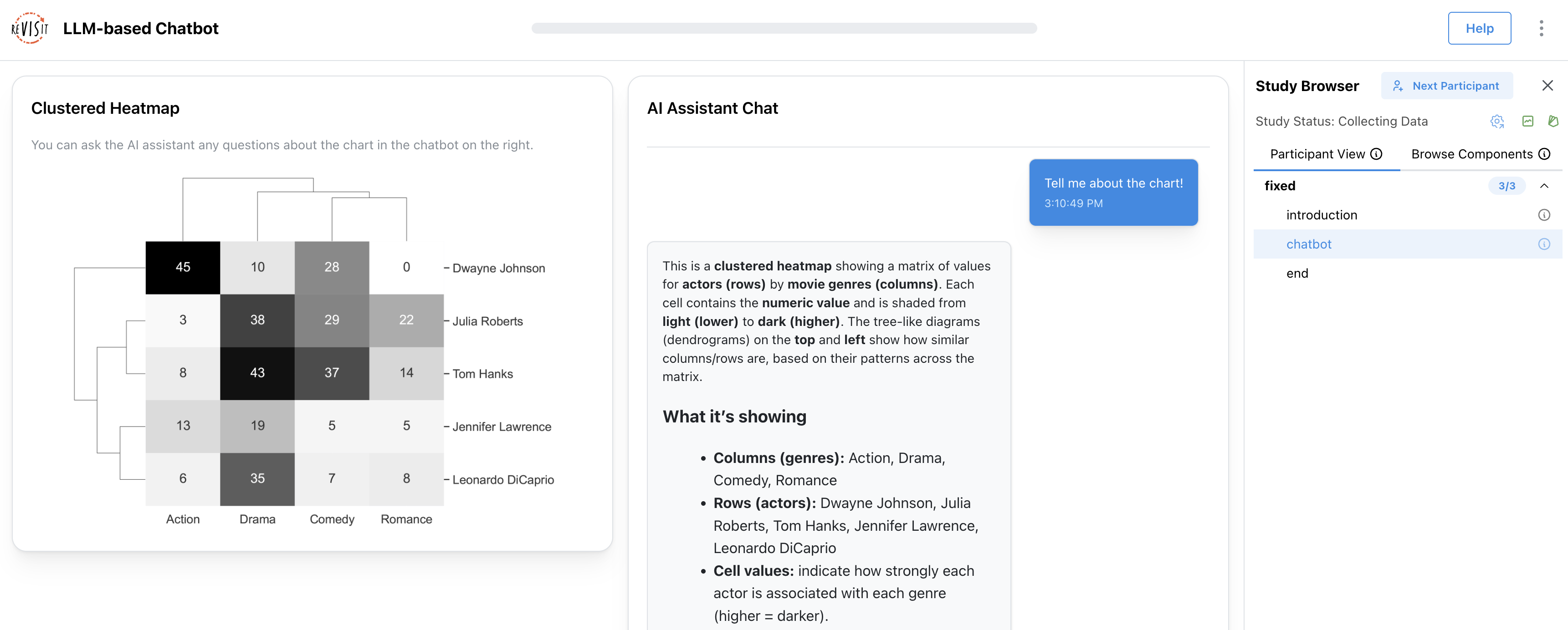
<p>Take a look at our <a href="https://revisit.dev/study/example-llm-chatbot/" target="_blank" rel="noopener noreferrer" class="">demo study</a>. The goal of this scenario was to help people learn about a chart. In this context, the chatbot should do more than simply generate answers. It should understand the study context, respond based on relevant materials, maintain continuity across turns, and make every interaction traceable for later analysis.</p>
<p><img decoding="async" loading="lazy" alt="A screenshot of the demo study, showing a clustered heat map on the left and a chatbot on the right, where a user has asked to tell them about the chart and the bot has answered" src="https://revisit.dev/PR232/assets/images/llm-chatbot-study-2deeeecd1d63ee3c55ef3d738def7fcc.png" width="3442" height="1384" class="img_ev3q"></p>
<p>Below, we describe why this chatbot is useful for studies, highlight its core features, and explain how to customize it.</p>
<h2 class="anchor anchorTargetStickyNavbar_Vzrq" id="what-does-this-chatbot-enable-in-our-demo-study">What does this chatbot enable in our demo study?<a href="https://revisit.dev/PR232/blog/2026/04/30/llm-in-revisit/#what-does-this-chatbot-enable-in-our-demo-study" class="hash-link" aria-label="Direct link to What does this chatbot enable in our demo study?" title="Direct link to What does this chatbot enable in our demo study?" translate="no">​</a></h2>
<p>In the demo study, participants can ask questions about a clustered heatmap, and the chatbot responds with streaming text. When a question requires exact data values or visual details, the chatbot can request the dataset or chart image. All inputs and outputs are tracked by <a href="https://apps.vdl.sci.utah.edu/trrackjs/" target="_blank" rel="noopener noreferrer" class="">Trrack, our provenance library</a>, making it possible to analyze how participants interact with the chatbot and what information they request.</p>
<p>Our example uses the <a href="https://developers.openai.com/api/reference/resources/responses" target="_blank" rel="noopener noreferrer" class="">OpenAI Responses API</a> and is implemented with the following features:</p>
<ul>
<li class=""><strong>Conversation memory:</strong> keeps the model aware of prior turns</li>
<li class=""><strong>Streaming responses:</strong> reduce perceived latency and make the interface feel more responsive</li>
<li class=""><strong>Sending the chart image and dataset only when needed:</strong> gives the chatbot access to study materials only when required</li>
<li class=""><strong>Recording provenance and conversation history:</strong> makes interactions traceable for later analysis</li>
</ul>
<h2 class="anchor anchorTargetStickyNavbar_Vzrq" id="how-can-you-use-and-customize-it">How can you use and customize it?<a href="https://revisit.dev/PR232/blog/2026/04/30/llm-in-revisit/#how-can-you-use-and-customize-it" class="hash-link" aria-label="Direct link to How can you use and customize it?" title="Direct link to How can you use and customize it?" translate="no">​</a></h2>
<p>The demo is designed to be flexible (check out the <a href="https://github.com/revisit-studies/study/tree/main/src/public/example-llm-chatbot/assets" target="_blank" rel="noopener noreferrer" class="">code</a>). Most settings live in <code>ChatInterface.tsx</code>, where you can customize the chatbot’s behavior and study materials.</p>
<h3 class="anchor anchorTargetStickyNavbar_Vzrq" id="set-up-the-api-key">Set up the API key<a href="https://revisit.dev/PR232/blog/2026/04/30/llm-in-revisit/#set-up-the-api-key" class="hash-link" aria-label="Direct link to Set up the API key" title="Direct link to Set up the API key" translate="no">​</a></h3>
<p>One challenge with LLM-based interfaces is keeping API keys secure in a (mostly) serverless environment such as a reVISit study. Our demo uses a proxy server to get around this problem. We created a simple proxy server for you, which you can find at <a href="https://github.com/visdesignlab/openai-api-proxy" target="_blank" rel="noopener noreferrer" class="">https://github.com/visdesignlab/openai-api-proxy</a>.</p>
<p>After deploying the proxy, set <code>VITE_OPENAI_API_URL</code> in your <code>.env</code> file for either local development or production.</p>
<h3 class="anchor anchorTargetStickyNavbar_Vzrq" id="adjust-the-chatbot-behavior">Adjust the Chatbot Behavior<a href="https://revisit.dev/PR232/blog/2026/04/30/llm-in-revisit/#adjust-the-chatbot-behavior" class="hash-link" aria-label="Direct link to Adjust the Chatbot Behavior" title="Direct link to Adjust the Chatbot Behavior" translate="no">​</a></h3>
<p>All key settings live in <code>ChatInterface.tsx</code>. The most relevant parameters are:</p>
<p><strong>Change the assistant behavior (system prompt)</strong><br>
<!-- -->Edit <code>prePrompt</code> and <code>toolPolicy</code> to control how the assistant responds and when it should use tools.</p>
<p>Learn more: <a href="https://platform.openai.com/docs/guides/responses#system-instructions" target="_blank" rel="noopener noreferrer" class="">System instructions</a></p>
<p><strong>Change the model</strong><br>
<!-- -->Update <code>model</code> in both the tool-selection request and the streaming request.</p>
<p>Learn more: <a href="https://platform.openai.com/docs/models" target="_blank" rel="noopener noreferrer" class="">Model list</a></p>
<p><strong>Change response length and style</strong></p>
<ul>
<li class=""><code>max_output_tokens</code>: maximum reply length</li>
<li class=""><code>temperature</code>: creativity level</li>
</ul>
<p>Learn more: <a href="https://platform.openai.com/docs/api-reference/responses" target="_blank" rel="noopener noreferrer" class="">Responses API parameters</a></p>
<h3 class="anchor anchorTargetStickyNavbar_Vzrq" id="replace-the-study-materials">Replace the study materials<a href="https://revisit.dev/PR232/blog/2026/04/30/llm-in-revisit/#replace-the-study-materials" class="hash-link" aria-label="Direct link to Replace the study materials" title="Direct link to Replace the study materials" translate="no">​</a></h3>
<p>You can also swap in your own resources:</p>
<ul>
<li class="">Replace <code>assets/data/clustered-heatmap.csv</code> with your dataset</li>
<li class="">Replace the chart image file ID with your own uploaded chart image</li>
</ul>
<p>Learn more: <a href="https://platform.openai.com/docs/api-reference/files" target="_blank" rel="noopener noreferrer" class="">Files API</a></p>
<p>This makes it straightforward to adapt the demo to different tasks, datasets, and visualizations.</p>
<h3 class="anchor anchorTargetStickyNavbar_Vzrq" id="get-the-results">Get the results<a href="https://revisit.dev/PR232/blog/2026/04/30/llm-in-revisit/#get-the-results" class="hash-link" aria-label="Direct link to Get the results" title="Direct link to Get the results" translate="no">​</a></h3>
<p>You can review participants’ interactions in the replay interface. The chat history is also included in the downloaded results in CSV or JSON format.</p>
<h2 class="anchor anchorTargetStickyNavbar_Vzrq" id="next-steps">Next steps<a href="https://revisit.dev/PR232/blog/2026/04/30/llm-in-revisit/#next-steps" class="hash-link" aria-label="Direct link to Next steps" title="Direct link to Next steps" translate="no">​</a></h2>
<p>Of course, you can also build wildly different intelligent interfaces to study, using our simple example here as a launching point!</p>
<p>This setup can also be combined with <a href="https://revisit.dev/docs/designing-studies/think-aloud/" target="_blank" rel="noopener noreferrer" class="">audio recording</a> or <a href="https://revisit.dev/docs/designing-studies/record-screen/" target="_blank" rel="noopener noreferrer" class="">screen recording</a> for remote unmoderated studies.</p>
<p>If you have questions or want to share what you build, come find us in the <a href="https://revisit-nsf.slack.com/join/shared_invite/zt-25mrh5ppi-6sDAL6HqcWJh_uvt2~~DMQ" target="_blank" rel="noopener noreferrer" class="">reVISit Slack</a>. We’d be excited to see how you apply these ideas in your own prototypes.</p>
<h2 class="anchor anchorTargetStickyNavbar_Vzrq" id="relevant-links">Relevant Links<a href="https://revisit.dev/PR232/blog/2026/04/30/llm-in-revisit/#relevant-links" class="hash-link" aria-label="Direct link to Relevant Links" title="Direct link to Relevant Links" translate="no">​</a></h2>
<ul>
<li class=""><a href="https://revisit.dev/study/example-llm-chatbot/" target="_blank" rel="noopener noreferrer" class="">Demo study</a></li>
<li class=""><a href="https://github.com/revisit-studies/study/blob/main/public/example-llm-chatbot/config.json" target="_blank" rel="noopener noreferrer" class="">The Study Config</a></li>
<li class=""><a href="https://github.com/revisit-studies/study/tree/main/src/public/example-llm-chatbot" target="_blank" rel="noopener noreferrer" class="">The React Component Sources</a></li>
</ul>]]></content>
        <author>
            <name>Tingying He</name>
            <uri>https://tingying-he.github.io/</uri>
        </author>
        <author>
            <name>Alexander Lex</name>
            <uri>https://alexander-lex.net/</uri>
        </author>
    </entry>
    <entry>
        <title type="html"><![CDATA[ReVISit 2.4: All About Speed and Stability!]]></title>
        <id>https://revisit.dev/PR232/blog/2026/02/23/release-2.4/</id>
        <link href="https://revisit.dev/PR232/blog/2026/02/23/release-2.4/"/>
        <updated>2026-02-23T00:00:00.000Z</updated>
        <summary type="html"><![CDATA[Version 2.4 of reVISit is out – and for once it doesn’t pack a lot of new features. Rather, it’s all about quality of life: we fixed bugs, improved stability, and, most importantly, made the documentation much much better!]]></summary>
        <content type="html"><![CDATA[<p>Version 2.4 of reVISit is out – and for once it doesn’t pack a lot of new features. Rather, it’s all about <strong>quality of life</strong>: we fixed bugs, improved stability, and, most importantly, made the documentation much much better!</p>
<p>We also added a few new things here and there, but they’re just quality of life improvements for supporting studies currently under development by the community.</p>
<h3 class="anchor anchorTargetStickyNavbar_Vzrq" id="should-i-update-now">Should I Update Now?<a href="https://revisit.dev/PR232/blog/2026/02/23/release-2.4/#should-i-update-now" class="hash-link" aria-label="Direct link to Should I Update Now?" title="Direct link to Should I Update Now?" translate="no">​</a></h3>
<p>We recommend that all reVISit users update to version 2.4, since it should provide a better experience to both developers and participants. However, if you have a study implemented in 2.3 that you’ve tested and piloted already and want to run tomorrow, you should probably stick with 2.3. After updating, make sure to run pilots with 2.4 to see whether everything works as expected.</p>
<p>So, let's dive into the details of what’s new in 2.4!</p>
<h3 class="anchor anchorTargetStickyNavbar_Vzrq" id="assigning-conditions-via-url-parameters">Assigning Conditions via URL Parameters<a href="https://revisit.dev/PR232/blog/2026/02/23/release-2.4/#assigning-conditions-via-url-parameters" class="hash-link" aria-label="Direct link to Assigning Conditions via URL Parameters" title="Direct link to Assigning Conditions via URL Parameters" translate="no">​</a></h3>
<p>Even with Latin squares, it can be <a href="https://revisit.dev/docs/faq/#q-how-can-i-ensure-balanced-numbers-of-participants-between-conditions-in-my-study-design" target="_blank" rel="noopener noreferrer" class="">tricky to get the balance of participants between conditions</a> in a between-subjects design right. To address this, we introduced conditions that can be passed into a study as a URL parameter. Check out the <a href="https://revisit.dev/study/demo-condition/" target="_blank" rel="noopener noreferrer" class="">demo</a> and the <a href="https://revisit.dev/docs/designing-studies/sequences/url-conditions/" target="_blank" rel="noopener noreferrer" class="">documentation</a>.</p>
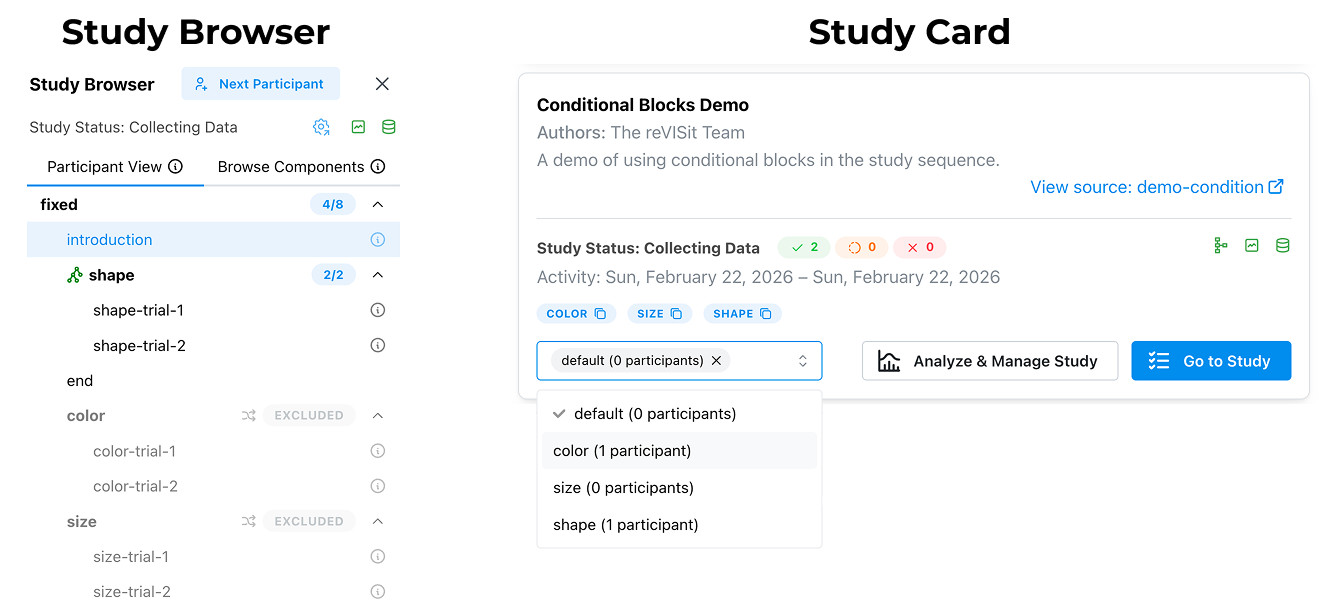
<p>For example, in a study with three conditions, this URL: <a href="https://revisit.dev/study/demo-condition?condition=shape" target="_blank" rel="noopener noreferrer" class="">https://revisit.dev/study/demo-condition?condition=shape</a> will drop a participant in the <code>shape</code> condition. You can see this in the study browser.</p>
<p><img decoding="async" loading="lazy" alt="The Study Browser and the Study Card showing the new conditional feature. In the browser, it’s evident that only one condition is active. In the card, you can choose the condition of the study" src="https://revisit.dev/PR232/assets/images/url-conditional-7854fcbe1f3fc48bd92f88e5de645916.png" width="1333" height="616" class="img_ev3q"></p>
<p>As always, the recorded data will contain the condition information allowing you to easily differentiate between cases in analysis. You can also see all of the defined conditions and jump right into them from the study card, as shown above.</p>
<p>You can define conditionals like this:</p>
<div class="language-json codeBlockContainer_Ckt0 theme-code-block" style="--prism-color:#393A34;--prism-background-color:#f6f8fa"><div class="codeBlockContent_QJqH"><pre tabindex="0" class="prism-code language-json codeBlock_bY9V thin-scrollbar" style="color:#393A34;background-color:#f6f8fa"><code class="codeBlockLines_e6Vv"><span class="token-line" style="color:#393A34"><span class="token punctuation" style="color:#393A34">{</span><span class="token plain"></span><br></span><span class="token-line" style="color:#393A34"><span class="token plain"> </span><span class="token property" style="color:#36acaa">"sequence"</span><span class="token operator" style="color:#393A34">:</span><span class="token plain"> </span><span class="token punctuation" style="color:#393A34">{</span><span class="token plain"></span><br></span><span class="token-line" style="color:#393A34"><span class="token plain">   </span><span class="token property" style="color:#36acaa">"order"</span><span class="token operator" style="color:#393A34">:</span><span class="token plain"> </span><span class="token string" style="color:#e3116c">"fixed"</span><span class="token punctuation" style="color:#393A34">,</span><span class="token plain"></span><br></span><span class="token-line" style="color:#393A34"><span class="token plain">   </span><span class="token property" style="color:#36acaa">"components"</span><span class="token operator" style="color:#393A34">:</span><span class="token plain"> </span><span class="token punctuation" style="color:#393A34">[</span><span class="token plain"></span><br></span><span class="token-line" style="color:#393A34"><span class="token plain">     </span><span class="token string" style="color:#e3116c">"introduction"</span><span class="token punctuation" style="color:#393A34">,</span><span class="token plain"></span><br></span><span class="token-line" style="color:#393A34"><span class="token plain">     </span><span class="token punctuation" style="color:#393A34">{</span><span class="token plain"></span><br></span><span class="token-line" style="color:#393A34"><span class="token plain">       </span><span class="token property" style="color:#36acaa">"id"</span><span class="token operator" style="color:#393A34">:</span><span class="token plain"> </span><span class="token string" style="color:#e3116c">"color"</span><span class="token punctuation" style="color:#393A34">,</span><span class="token plain"></span><br></span><span class="token-line" style="color:#393A34"><span class="token plain">       </span><span class="token property" style="color:#36acaa">"conditional"</span><span class="token operator" style="color:#393A34">:</span><span class="token plain"> </span><span class="token boolean" style="color:#36acaa">true</span><span class="token punctuation" style="color:#393A34">,</span><span class="token plain"></span><br></span><span class="token-line" style="color:#393A34"><span class="token plain">       </span><span class="token property" style="color:#36acaa">"components"</span><span class="token operator" style="color:#393A34">:</span><span class="token plain"> </span><span class="token punctuation" style="color:#393A34">[</span><span class="token string" style="color:#e3116c">"color-trial-1"</span><span class="token punctuation" style="color:#393A34">,</span><span class="token plain"> </span><span class="token string" style="color:#e3116c">"color-trial-2"</span><span class="token punctuation" style="color:#393A34">]</span><span class="token punctuation" style="color:#393A34">,</span><span class="token plain"></span><br></span><span class="token-line" style="color:#393A34"><span class="token plain">       </span><span class="token property" style="color:#36acaa">"order"</span><span class="token operator" style="color:#393A34">:</span><span class="token plain"> </span><span class="token string" style="color:#e3116c">"random"</span><span class="token plain"></span><br></span><span class="token-line" style="color:#393A34"><span class="token plain">     </span><span class="token punctuation" style="color:#393A34">}</span><span class="token punctuation" style="color:#393A34">,</span><span class="token plain"></span><br></span><span class="token-line" style="color:#393A34"><span class="token plain">     </span><span class="token punctuation" style="color:#393A34">{</span><span class="token plain"></span><br></span><span class="token-line" style="color:#393A34"><span class="token plain">       </span><span class="token property" style="color:#36acaa">"id"</span><span class="token operator" style="color:#393A34">:</span><span class="token plain"> </span><span class="token string" style="color:#e3116c">"shape"</span><span class="token punctuation" style="color:#393A34">,</span><span class="token plain"></span><br></span><span class="token-line" style="color:#393A34"><span class="token plain">       </span><span class="token property" style="color:#36acaa">"conditional"</span><span class="token operator" style="color:#393A34">:</span><span class="token plain"> </span><span class="token boolean" style="color:#36acaa">true</span><span class="token punctuation" style="color:#393A34">,</span><span class="token plain"></span><br></span><span class="token-line" style="color:#393A34"><span class="token plain">       </span><span class="token property" style="color:#36acaa">"components"</span><span class="token operator" style="color:#393A34">:</span><span class="token plain"> </span><span class="token punctuation" style="color:#393A34">[</span><span class="token string" style="color:#e3116c">"shape-trial-1"</span><span class="token punctuation" style="color:#393A34">,</span><span class="token plain"> </span><span class="token string" style="color:#e3116c">"shape-trial-2"</span><span class="token punctuation" style="color:#393A34">]</span><span class="token punctuation" style="color:#393A34">,</span><span class="token plain"></span><br></span><span class="token-line" style="color:#393A34"><span class="token plain">       </span><span class="token property" style="color:#36acaa">"order"</span><span class="token operator" style="color:#393A34">:</span><span class="token plain"> </span><span class="token string" style="color:#e3116c">"fixed"</span><span class="token plain"></span><br></span><span class="token-line" style="color:#393A34"><span class="token plain">     </span><span class="token punctuation" style="color:#393A34">}</span><span class="token plain"></span><br></span><span class="token-line" style="color:#393A34"><span class="token plain">   </span><span class="token punctuation" style="color:#393A34">]</span><span class="token plain"></span><br></span><span class="token-line" style="color:#393A34"><span class="token plain"> </span><span class="token punctuation" style="color:#393A34">}</span><span class="token plain"></span><br></span><span class="token-line" style="color:#393A34"><span class="token plain"></span><span class="token punctuation" style="color:#393A34">}</span><br></span></code></pre></div></div>
<p>The key additions to get this functionality are the <code>conditional</code> flag and the <code>id</code> key. Make sure to make your ids unique!</p>
<p>With this feature, you’ll be able to use dedicated links to recruit participants for each condition (for example, using two different Prolific studies), and keep recruiting until you have reached the desired number of participants for each.</p>
<p>You can also assign multiple conditions at the same time, like this: <a href="https://revisit.dev/study/demo-condition?condition=color,size" target="_blank" rel="noopener noreferrer" class="">https://revisit.dev/study/demo-condition?condition=color,size</a></p>
<h3 class="anchor anchorTargetStickyNavbar_Vzrq" id="include-the-same-component-multiple-times">Include the Same Component Multiple Times<a href="https://revisit.dev/PR232/blog/2026/02/23/release-2.4/#include-the-same-component-multiple-times" class="hash-link" aria-label="Direct link to Include the Same Component Multiple Times" title="Direct link to Include the Same Component Multiple Times" translate="no">​</a></h3>
<p>Sometimes you want to include the same component multiple times in your study. For example, you might want to measure task load after each task. This wasn’t possible in reVISit yet (you could hack it by using inheritance). Now, however, that’s easy to do: just include the same component multiple times. For example, if you include a component <code>nasa-tlx</code> after each task, you’ll have access to <code>nasa-tlx-1</code>, <code>nasa-tlx-2</code>, etc, in the data.</p>
<h3 class="anchor anchorTargetStickyNavbar_Vzrq" id="changes-to-how-library-components-are-included">Changes to How Library Components are Included<a href="https://revisit.dev/PR232/blog/2026/02/23/release-2.4/#changes-to-how-library-components-are-included" class="hash-link" aria-label="Direct link to Changes to How Library Components are Included" title="Direct link to Changes to How Library Components are Included" translate="no">​</a></h3>
<p>We previously supported referring to components of libraries as <code>$libraryName.co.componentName</code> as well as <code>$libraryName.components.componentName</code>, and similarly used <code>.se</code> or <code>.sequences</code> for sequence. The shorthand is now deprecated; new studies should only use <code>.components</code> and <code>.sequences</code>.</p>
<h3 class="anchor anchorTargetStickyNavbar_Vzrq" id="performance">Performance<a href="https://revisit.dev/PR232/blog/2026/02/23/release-2.4/#performance" class="hash-link" aria-label="Direct link to Performance" title="Direct link to Performance" translate="no">​</a></h3>
<p>We have <strong>virtualized our study browser</strong> so that it does not render information for every possible study component at once. For studies which had large amounts of components (think 1000+) this was causing slowdowns during development.</p>
<p>We have also fixed a number of small bugs that impacted performance, especially for studies which contained large amounts of provenance data. Such studies should see a significant participant facing performance improvement in 2.4.</p>
<h3 class="anchor anchorTargetStickyNavbar_Vzrq" id="testing">Testing<a href="https://revisit.dev/PR232/blog/2026/02/23/release-2.4/#testing" class="hash-link" aria-label="Direct link to Testing" title="Direct link to Testing" translate="no">​</a></h3>
<p>A key focus of this update has been to improve the robustness of our infrastructure. Previously we had focused on using integration level tests using the playwright test framework. With this update we added more than 300 unit tests, which improves the quality of our tests, makes the run faster, and more specifically.</p>
<h3 class="anchor anchorTargetStickyNavbar_Vzrq" id="better-errors-and-warnings">Better Errors and Warnings<a href="https://revisit.dev/PR232/blog/2026/02/23/release-2.4/#better-errors-and-warnings" class="hash-link" aria-label="Direct link to Better Errors and Warnings" title="Direct link to Better Errors and Warnings" translate="no">​</a></h3>
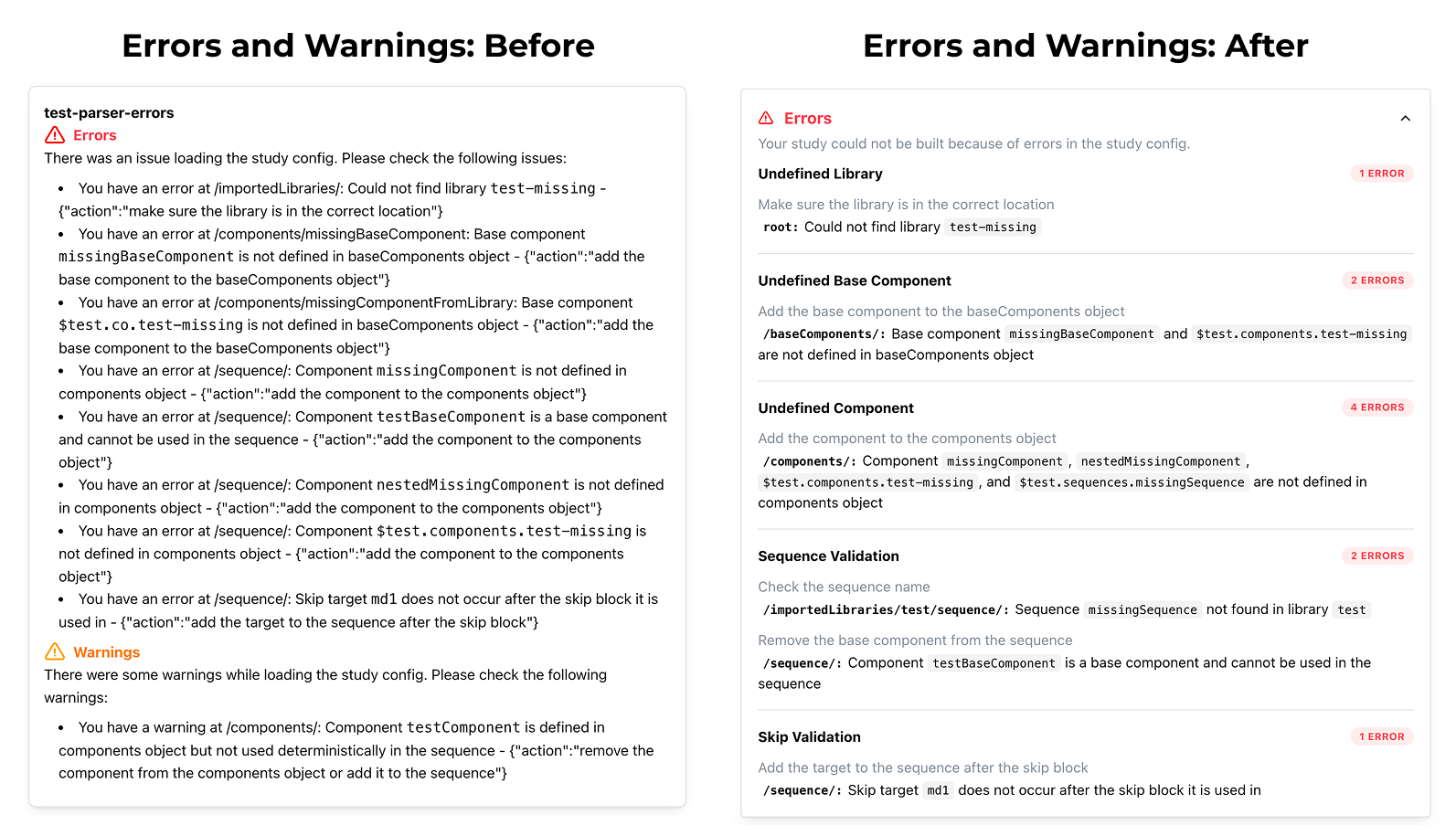
<p>Good error messages are essential for the development experience, so we’ve improved how errors and warnings for specification problems look:</p>
<p><img decoding="async" loading="lazy" alt="A comparison of before and after for error messages. The before shows a bullet list with no formatting, the after has nice formatting, highlighting and separation." src="https://revisit.dev/PR232/assets/images/errors-3ba4f6b5525efa780e861a4c6f5b21bb.png" width="1593" height="915" class="img_ev3q"></p>
<h3 class="anchor anchorTargetStickyNavbar_Vzrq" id="bug-fixes-and-updating">Bug Fixes and Updating<a href="https://revisit.dev/PR232/blog/2026/02/23/release-2.4/#bug-fixes-and-updating" class="hash-link" aria-label="Direct link to Bug Fixes and Updating" title="Direct link to Bug Fixes and Updating" translate="no">​</a></h3>
<p>With this release, we closed over 80 issues on GitHub. For details on the bugs that were fixed, take a look at the <a href="https://github.com/revisit-studies/study/releases/tag/v2.4.0" target="_blank" rel="noopener noreferrer" class="">release logs</a>.</p>]]></content>
        <author>
            <name>The ReVISit Team</name>
        </author>
    </entry>
    <entry>
        <title type="html"><![CDATA[Remote Usability Testing of Figma Prototypes with reVISit]]></title>
        <id>https://revisit.dev/PR232/blog/2026/02/21/figma-prototype-testing/</id>
        <link href="https://revisit.dev/PR232/blog/2026/02/21/figma-prototype-testing/"/>
        <updated>2026-02-21T00:00:00.000Z</updated>
        <summary type="html"><![CDATA[Scheduling one-on-one usability sessions is time-consuming, expensive, and hard to scale. With reVISit's screen recording and think-aloud audio features, you can run instrumented prototype studies asynchronously — participants navigate your Figma prototype while their screen and voice are captured, and you can run multiple participants at once!]]></summary>
        <content type="html"><![CDATA[<p>Scheduling one-on-one usability sessions is time-consuming, expensive, and hard to scale. With reVISit's <strong>screen recording</strong> and <strong>think-aloud audio</strong> features, you can run instrumented prototype studies asynchronously — participants navigate your Figma prototype while their screen and voice are captured, and you can run multiple participants at once!</p>
<h2 class="anchor anchorTargetStickyNavbar_Vzrq" id="why-test-figma-prototypes-with-revisit">Why Test Figma Prototypes with reVISit?<a href="https://revisit.dev/PR232/blog/2026/02/21/figma-prototype-testing/#why-test-figma-prototypes-with-revisit" class="hash-link" aria-label="Direct link to Why Test Figma Prototypes with reVISit?" title="Direct link to Why Test Figma Prototypes with reVISit?" translate="no">​</a></h2>
<p>Usability testing can be difficult. You have to track people down, schedule a time for the session, and repeat for each user. Remote testing, e.g., via Zoom, is possible, but still requires you to be online at the same time.</p>
<p>ReVISit now offers an alternative through its new screen recording and audio think-aloud features. Because Figma provides shareable embed URLs for interactive prototypes, you can drop one directly into a reVISit <code>website</code> component using iframes — with very little coding needed. Layering on <code>"recordScreen": true</code> and <code>"recordAudio": true</code> gives you:</p>
<ul>
<li class=""><strong>Screen recordings</strong> of every participant's navigation path through the prototype</li>
<li class=""><strong>Synchronized think-aloud audio</strong> so you can hear their reasoning alongside what they see</li>
<li class=""><strong>Structured questionnaires</strong> before and after the prototype task — in the same study, same dataset</li>
<li class=""><strong>Participant Replay</strong> to watch recordings back with audio aligned on a single timeline</li>
</ul>
<p>The entire study is defined in a single JSON config, and all data lands in your reVISit storage automatically.</p>
<h2 class="anchor anchorTargetStickyNavbar_Vzrq" id="step-1-enable-screen-recording-and-think-aloud-audio">Step 1: Enable Screen Recording and Think-Aloud Audio<a href="https://revisit.dev/PR232/blog/2026/02/21/figma-prototype-testing/#step-1-enable-screen-recording-and-think-aloud-audio" class="hash-link" aria-label="Direct link to Step 1: Enable Screen Recording and Think-Aloud Audio" title="Direct link to Step 1: Enable Screen Recording and Think-Aloud Audio" translate="no">​</a></h2>
<p>Start by turning on both capture modes in the top-level <code>uiConfig</code> block:</p>
<div class="language-json codeBlockContainer_Ckt0 theme-code-block" style="--prism-color:#393A34;--prism-background-color:#f6f8fa"><div class="codeBlockContent_QJqH"><pre tabindex="0" class="prism-code language-json codeBlock_bY9V thin-scrollbar" style="color:#393A34;background-color:#f6f8fa"><code class="codeBlockLines_e6Vv"><span class="token-line" style="color:#393A34"><span class="token property" style="color:#36acaa">"uiConfig"</span><span class="token operator" style="color:#393A34">:</span><span class="token plain"> </span><span class="token punctuation" style="color:#393A34">{</span><span class="token plain"></span><br></span><span class="token-line" style="color:#393A34"><span class="token plain">  </span><span class="token property" style="color:#36acaa">"recordScreen"</span><span class="token operator" style="color:#393A34">:</span><span class="token plain"> </span><span class="token boolean" style="color:#36acaa">true</span><span class="token punctuation" style="color:#393A34">,</span><span class="token plain"></span><br></span><span class="token-line" style="color:#393A34"><span class="token plain">  </span><span class="token property" style="color:#36acaa">"recordAudio"</span><span class="token operator" style="color:#393A34">:</span><span class="token plain"> </span><span class="token boolean" style="color:#36acaa">true</span><span class="token punctuation" style="color:#393A34">,</span><span class="token plain"></span><br></span><span class="token-line" style="color:#393A34"><span class="token plain">  </span><span class="token property" style="color:#36acaa">"withProgressBar"</span><span class="token operator" style="color:#393A34">:</span><span class="token plain"> </span><span class="token boolean" style="color:#36acaa">true</span><span class="token punctuation" style="color:#393A34">,</span><span class="token plain"></span><br></span><span class="token-line" style="color:#393A34"><span class="token plain">  </span><span class="token property" style="color:#36acaa">"withSidebar"</span><span class="token operator" style="color:#393A34">:</span><span class="token plain"> </span><span class="token boolean" style="color:#36acaa">true</span><span class="token punctuation" style="color:#393A34">,</span><span class="token plain"></span><br></span><span class="token-line" style="color:#393A34"><span class="token plain">  </span><span class="token property" style="color:#36acaa">"contactEmail"</span><span class="token operator" style="color:#393A34">:</span><span class="token plain"> </span><span class="token string" style="color:#e3116c">"your@email.com"</span><span class="token plain"></span><br></span><span class="token-line" style="color:#393A34"><span class="token plain"></span><span class="token punctuation" style="color:#393A34">}</span><br></span></code></pre></div></div>
<p>Then import the companion library that handles participant permissions:</p>
<div class="language-json codeBlockContainer_Ckt0 theme-code-block" style="--prism-color:#393A34;--prism-background-color:#f6f8fa"><div class="codeBlockContent_QJqH"><pre tabindex="0" class="prism-code language-json codeBlock_bY9V thin-scrollbar" style="color:#393A34;background-color:#f6f8fa"><code class="codeBlockLines_e6Vv"><span class="token-line" style="color:#393A34"><span class="token property" style="color:#36acaa">"importedLibraries"</span><span class="token operator" style="color:#393A34">:</span><span class="token plain"> </span><span class="token punctuation" style="color:#393A34">[</span><span class="token string" style="color:#e3116c">"screen-recording"</span><span class="token punctuation" style="color:#393A34">]</span><br></span></code></pre></div></div>
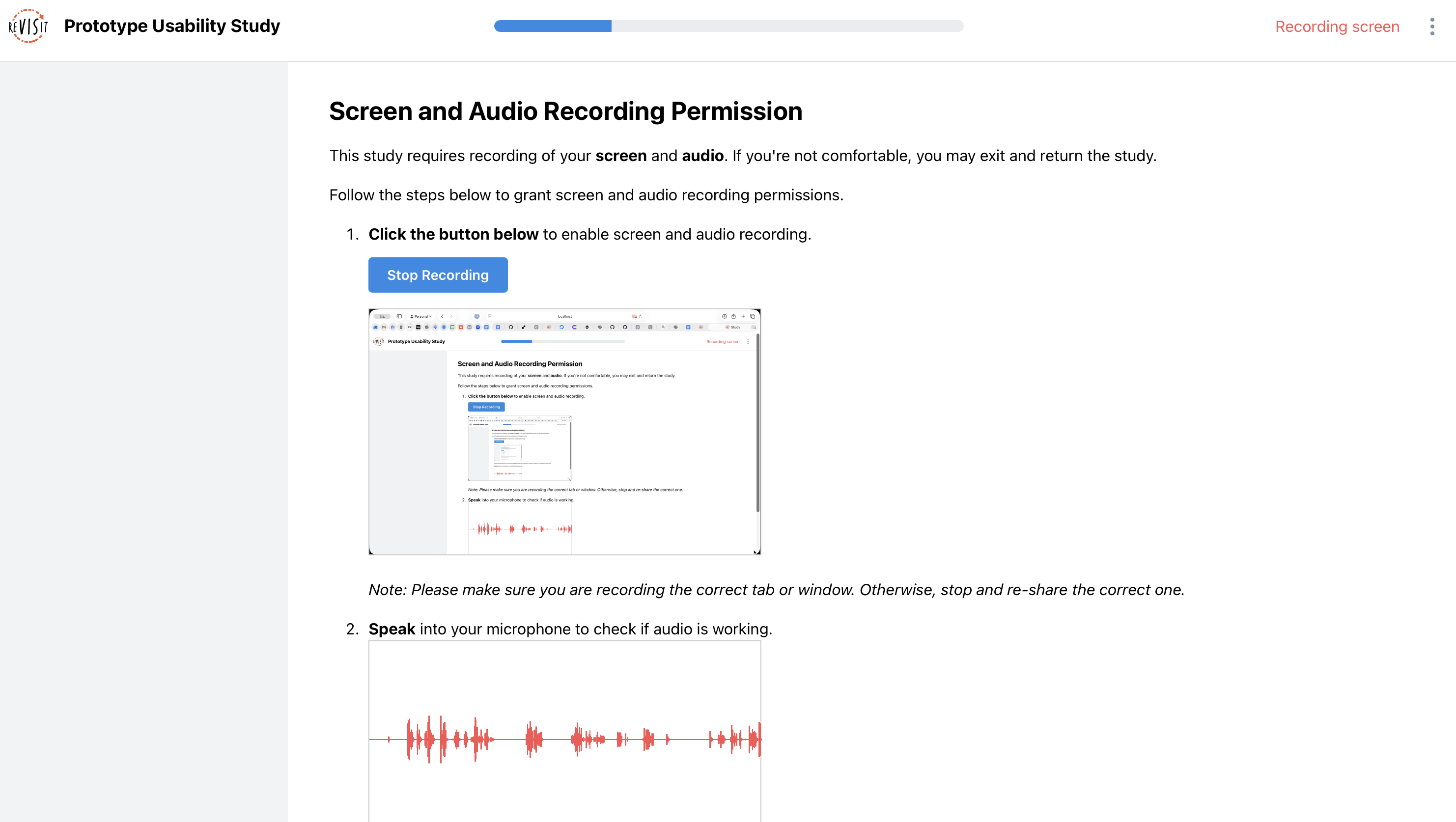
<p>The <strong><code>screen-recording</code></strong> library provides a <code>screenRecordingPermission</code> component that asks participants to share their browser tab — similar to screen-sharing in a video call. When <code>recordAudio: true</code> is also set, the permissions step requests microphone access at the same time. ReVISit blocks progression if either permission is denied.</p>
<p>Insert the permission step near the start of your study sequence:</p>
<div class="language-json codeBlockContainer_Ckt0 theme-code-block" style="--prism-color:#393A34;--prism-background-color:#f6f8fa"><div class="codeBlockContent_QJqH"><pre tabindex="0" class="prism-code language-json codeBlock_bY9V thin-scrollbar" style="color:#393A34;background-color:#f6f8fa"><code class="codeBlockLines_e6Vv"><span class="token-line" style="color:#393A34"><span class="token property" style="color:#36acaa">"sequence"</span><span class="token operator" style="color:#393A34">:</span><span class="token plain"> </span><span class="token punctuation" style="color:#393A34">{</span><span class="token plain"></span><br></span><span class="token-line" style="color:#393A34"><span class="token plain">  </span><span class="token property" style="color:#36acaa">"order"</span><span class="token operator" style="color:#393A34">:</span><span class="token plain"> </span><span class="token string" style="color:#e3116c">"fixed"</span><span class="token punctuation" style="color:#393A34">,</span><span class="token plain"></span><br></span><span class="token-line" style="color:#393A34"><span class="token plain">  </span><span class="token property" style="color:#36acaa">"components"</span><span class="token operator" style="color:#393A34">:</span><span class="token plain"> </span><span class="token punctuation" style="color:#393A34">[</span><span class="token plain"></span><br></span><span class="token-line" style="color:#393A34"><span class="token plain">    </span><span class="token string" style="color:#e3116c">"introduction"</span><span class="token punctuation" style="color:#393A34">,</span><span class="token plain"></span><br></span><span class="token-line" style="color:#393A34"><span class="token plain">    </span><span class="token string" style="color:#e3116c">"$screen-recording.co.screenRecordingPermission"</span><span class="token punctuation" style="color:#393A34">,</span><span class="token plain"></span><br></span><span class="token-line" style="color:#393A34"><span class="token plain">    </span><span class="token string" style="color:#e3116c">"figmaTask"</span><span class="token punctuation" style="color:#393A34">,</span><span class="token plain"></span><br></span><span class="token-line" style="color:#393A34"><span class="token plain">    </span><span class="token string" style="color:#e3116c">"postTaskQuestions"</span><span class="token plain"></span><br></span><span class="token-line" style="color:#393A34"><span class="token plain">  </span><span class="token punctuation" style="color:#393A34">]</span><span class="token plain"></span><br></span><span class="token-line" style="color:#393A34"><span class="token plain"></span><span class="token punctuation" style="color:#393A34">}</span><br></span></code></pre></div></div>
<p><img decoding="async" loading="lazy" alt="The permissions step participants encounter before the study begins — the browser&amp;#39;s native &amp;quot;Choose what to share&amp;quot; dialog with the reVISit study tab pre-selected, alongside the microphone permission prompt. Both are requested together on the same screen." src="https://revisit.dev/PR232/assets/images/figma-1-7dfe7996eddaf5e3a15f248c76d5dd48.png" width="2922" height="1424" class="img_ev3q"></p>
<h2 class="anchor anchorTargetStickyNavbar_Vzrq" id="step-2-embed-your-figma-prototype">Step 2: Embed Your Figma Prototype<a href="https://revisit.dev/PR232/blog/2026/02/21/figma-prototype-testing/#step-2-embed-your-figma-prototype" class="hash-link" aria-label="Direct link to Step 2: Embed Your Figma Prototype" title="Direct link to Step 2: Embed Your Figma Prototype" translate="no">​</a></h2>
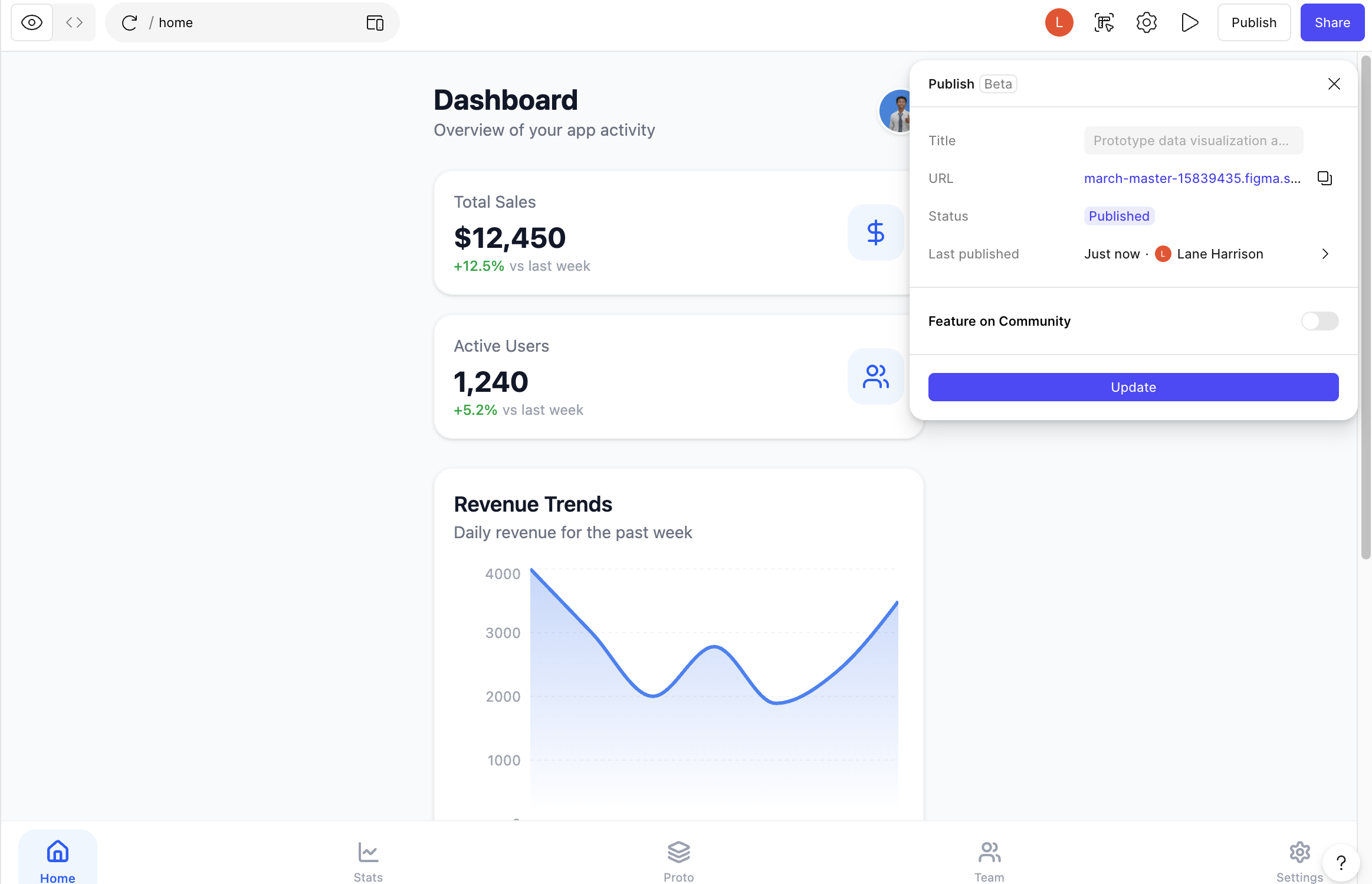
<p>In Figma, open your prototype, click <strong>Share → Open embed code</strong> or <strong>Publish</strong>, and copy the URL from the <code>src</code> attribute of the generated <code>&lt;iframe&gt;</code> tag. It will look something like:</p>
<div class="language-text codeBlockContainer_Ckt0 theme-code-block" style="--prism-color:#393A34;--prism-background-color:#f6f8fa"><div class="codeBlockContent_QJqH"><pre tabindex="0" class="prism-code language-text codeBlock_bY9V thin-scrollbar" style="color:#393A34;background-color:#f6f8fa"><code class="codeBlockLines_e6Vv"><span class="token-line" style="color:#393A34"><span class="token plain">https://embed.figma.com/proto/&lt;FILE_ID&gt;/&lt;PROTOTYPE_NAME&gt;?node-id=...&amp;scaling=min-zoom&amp;embed-host=share</span><br></span></code></pre></div></div>
<p><img decoding="async" loading="lazy" alt="The interface on Figma for publishing a prototype." src="https://revisit.dev/PR232/assets/images/figma-4-31fb89eebe9a0f3241de6a272d6d9120.png" width="2326" height="1498" class="img_ev3q"></p>
<p>Paste that URL into a <code>website</code> component in your reVISit config:</p>
<div class="language-json codeBlockContainer_Ckt0 theme-code-block" style="--prism-color:#393A34;--prism-background-color:#f6f8fa"><div class="codeBlockContent_QJqH"><pre tabindex="0" class="prism-code language-json codeBlock_bY9V thin-scrollbar" style="color:#393A34;background-color:#f6f8fa"><code class="codeBlockLines_e6Vv"><span class="token-line" style="color:#393A34"><span class="token property" style="color:#36acaa">"figmaTask"</span><span class="token operator" style="color:#393A34">:</span><span class="token plain"> </span><span class="token punctuation" style="color:#393A34">{</span><span class="token plain"></span><br></span><span class="token-line" style="color:#393A34"><span class="token plain">  </span><span class="token property" style="color:#36acaa">"type"</span><span class="token operator" style="color:#393A34">:</span><span class="token plain"> </span><span class="token string" style="color:#e3116c">"website"</span><span class="token punctuation" style="color:#393A34">,</span><span class="token plain"></span><br></span><span class="token-line" style="color:#393A34"><span class="token plain">  </span><span class="token property" style="color:#36acaa">"recordAudio"</span><span class="token operator" style="color:#393A34">:</span><span class="token plain"> </span><span class="token boolean" style="color:#36acaa">true</span><span class="token punctuation" style="color:#393A34">,</span><span class="token plain"></span><br></span><span class="token-line" style="color:#393A34"><span class="token plain">  </span><span class="token property" style="color:#36acaa">"recordScreen"</span><span class="token operator" style="color:#393A34">:</span><span class="token plain"> </span><span class="token boolean" style="color:#36acaa">true</span><span class="token punctuation" style="color:#393A34">,</span><span class="token plain"></span><br></span><span class="token-line" style="color:#393A34"><span class="token plain">  </span><span class="token property" style="color:#36acaa">"path"</span><span class="token operator" style="color:#393A34">:</span><span class="token plain"> </span><span class="token string" style="color:#e3116c">"https://embed.figma.com/proto/&lt;YOUR_FILE_ID&gt;/&lt;PROTOTYPE_NAME&gt;?..."</span><span class="token punctuation" style="color:#393A34">,</span><span class="token plain"></span><br></span><span class="token-line" style="color:#393A34"><span class="token plain">  </span><span class="token property" style="color:#36acaa">"instruction"</span><span class="token operator" style="color:#393A34">:</span><span class="token plain"> </span><span class="token string" style="color:#e3116c">"Please explore the prototype below. As you navigate, speak your thoughts aloud — tell us what you notice, what you expect, and anything that feels unclear or surprising."</span><span class="token punctuation" style="color:#393A34">,</span><span class="token plain"></span><br></span><span class="token-line" style="color:#393A34"><span class="token plain">  </span><span class="token property" style="color:#36acaa">"response"</span><span class="token operator" style="color:#393A34">:</span><span class="token plain"> </span><span class="token punctuation" style="color:#393A34">[</span><span class="token punctuation" style="color:#393A34">]</span><span class="token plain"></span><br></span><span class="token-line" style="color:#393A34"><span class="token plain"></span><span class="token punctuation" style="color:#393A34">}</span><br></span></code></pre></div></div>
<p>Setting <code>recordAudio</code> and <code>recordScreen</code> on the component itself is optional when they are already enabled globally in <code>uiConfig</code>, but it is good practice to be explicit — especially if you want different recording behavior on other components (e.g., a plain questionnaire where you turn audio off).</p>
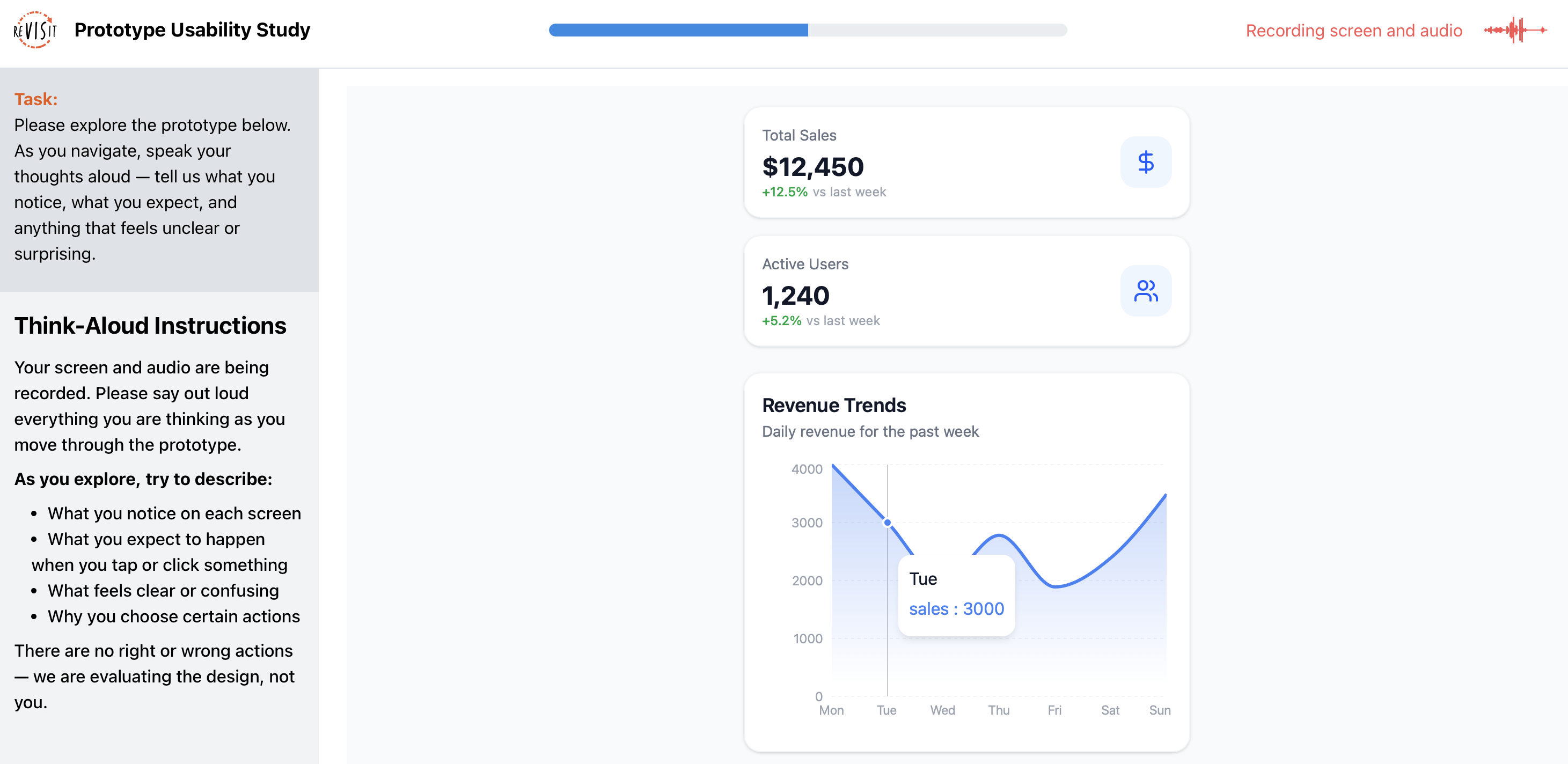
<p><img decoding="async" loading="lazy" alt="The reVISit participant view during the prototype task — the Figma prototype is embedded in the main content area, fully interactive, while the right sidebar displays the think-aloud instructions in a scrollable panel. The progress bar is visible at the top of the page." src="https://revisit.dev/PR232/assets/images/figma-2-c17ef97c514a9fbc45d1107ac0f62f99.png" width="2990" height="1692" class="img_ev3q"></p>
<h2 class="anchor anchorTargetStickyNavbar_Vzrq" id="step-3-guide-participants-with-sidebar-instructions">Step 3: Guide Participants with Sidebar Instructions<a href="https://revisit.dev/PR232/blog/2026/02/21/figma-prototype-testing/#step-3-guide-participants-with-sidebar-instructions" class="hash-link" aria-label="Direct link to Step 3: Guide Participants with Sidebar Instructions" title="Direct link to Step 3: Guide Participants with Sidebar Instructions" translate="no">​</a></h2>
<p>Without a moderator in the room, it can be easy for participants to forget to think aloud or to drift into their working process. It can be useful to include an on screen prompt to remind them to stay on task.
Add a <code>textOnly</code> response at <code>"location": "sidebar"</code> to keep instructions visible throughout the entire task:</p>
<div class="language-json codeBlockContainer_Ckt0 theme-code-block" style="--prism-color:#393A34;--prism-background-color:#f6f8fa"><div class="codeBlockContent_QJqH"><pre tabindex="0" class="prism-code language-json codeBlock_bY9V thin-scrollbar" style="color:#393A34;background-color:#f6f8fa"><code class="codeBlockLines_e6Vv"><span class="token-line" style="color:#393A34"><span class="token property" style="color:#36acaa">"response"</span><span class="token operator" style="color:#393A34">:</span><span class="token plain"> </span><span class="token punctuation" style="color:#393A34">[</span><span class="token plain"></span><br></span><span class="token-line" style="color:#393A34"><span class="token plain">  </span><span class="token punctuation" style="color:#393A34">{</span><span class="token plain"></span><br></span><span class="token-line" style="color:#393A34"><span class="token plain">    </span><span class="token property" style="color:#36acaa">"id"</span><span class="token operator" style="color:#393A34">:</span><span class="token plain"> </span><span class="token string" style="color:#e3116c">"think-aloud-instructions"</span><span class="token punctuation" style="color:#393A34">,</span><span class="token plain"></span><br></span><span class="token-line" style="color:#393A34"><span class="token plain">    </span><span class="token property" style="color:#36acaa">"type"</span><span class="token operator" style="color:#393A34">:</span><span class="token plain"> </span><span class="token string" style="color:#e3116c">"textOnly"</span><span class="token punctuation" style="color:#393A34">,</span><span class="token plain"></span><br></span><span class="token-line" style="color:#393A34"><span class="token plain">    </span><span class="token property" style="color:#36acaa">"location"</span><span class="token operator" style="color:#393A34">:</span><span class="token plain"> </span><span class="token string" style="color:#e3116c">"sidebar"</span><span class="token punctuation" style="color:#393A34">,</span><span class="token plain"></span><br></span><span class="token-line" style="color:#393A34"><span class="token plain">    </span><span class="token property" style="color:#36acaa">"prompt"</span><span class="token operator" style="color:#393A34">:</span><span class="token plain"> </span><span class="token string" style="color:#e3116c">"### Think-Aloud Instructions\n\nYour screen and audio are being recorded. Please say out loud everything you are thinking as you move through the prototype.\n\n**As you explore, try to describe:**\n\n- What you notice on each screen\n- What you expect to happen when you tap or click something\n- What feels clear or confusing\n- Why you choose certain actions\n\nThere are no right or wrong actions — we are evaluating the design, not you."</span><span class="token plain"></span><br></span><span class="token-line" style="color:#393A34"><span class="token plain">  </span><span class="token punctuation" style="color:#393A34">}</span><span class="token plain"></span><br></span><span class="token-line" style="color:#393A34"><span class="token plain"></span><span class="token punctuation" style="color:#393A34">]</span><br></span></code></pre></div></div>
<p>Sidebar content remains pinned while participants scroll or interact, so the instructions stay in view even as they move through multiple prototype screens.</p>
<h2 class="anchor anchorTargetStickyNavbar_Vzrq" id="step-4-collect-structured-post-task-feedback">Step 4: Collect Structured Post-Task Feedback<a href="https://revisit.dev/PR232/blog/2026/02/21/figma-prototype-testing/#step-4-collect-structured-post-task-feedback" class="hash-link" aria-label="Direct link to Step 4: Collect Structured Post-Task Feedback" title="Direct link to Step 4: Collect Structured Post-Task Feedback" translate="no">​</a></h2>
<p>Follow the prototype task with a <code>questionnaire</code> component. Setting <code>"recordAudio": true</code> on it means participants can continue to narrate their thoughts while they fill out rating scales and open-ended questions — a useful signal for interpreting their written responses. Alternately, you might design a series of pages with one spoken question per page, which will automatically be segmented by reVISit's trial management architecture.</p>
<div class="language-json codeBlockContainer_Ckt0 theme-code-block" style="--prism-color:#393A34;--prism-background-color:#f6f8fa"><div class="codeBlockContent_QJqH"><pre tabindex="0" class="prism-code language-json codeBlock_bY9V thin-scrollbar" style="color:#393A34;background-color:#f6f8fa"><code class="codeBlockLines_e6Vv"><span class="token-line" style="color:#393A34"><span class="token property" style="color:#36acaa">"postTaskQuestions"</span><span class="token operator" style="color:#393A34">:</span><span class="token plain"> </span><span class="token punctuation" style="color:#393A34">{</span><span class="token plain"></span><br></span><span class="token-line" style="color:#393A34"><span class="token plain">  </span><span class="token property" style="color:#36acaa">"type"</span><span class="token operator" style="color:#393A34">:</span><span class="token plain"> </span><span class="token string" style="color:#e3116c">"questionnaire"</span><span class="token punctuation" style="color:#393A34">,</span><span class="token plain"></span><br></span><span class="token-line" style="color:#393A34"><span class="token plain">  </span><span class="token property" style="color:#36acaa">"recordAudio"</span><span class="token operator" style="color:#393A34">:</span><span class="token plain"> </span><span class="token boolean" style="color:#36acaa">true</span><span class="token punctuation" style="color:#393A34">,</span><span class="token plain"></span><br></span><span class="token-line" style="color:#393A34"><span class="token plain">  </span><span class="token property" style="color:#36acaa">"response"</span><span class="token operator" style="color:#393A34">:</span><span class="token plain"> </span><span class="token punctuation" style="color:#393A34">[</span><span class="token plain"></span><br></span><span class="token-line" style="color:#393A34"><span class="token plain">    </span><span class="token punctuation" style="color:#393A34">{</span><span class="token plain"></span><br></span><span class="token-line" style="color:#393A34"><span class="token plain">      </span><span class="token property" style="color:#36acaa">"id"</span><span class="token operator" style="color:#393A34">:</span><span class="token plain"> </span><span class="token string" style="color:#e3116c">"satisfaction"</span><span class="token punctuation" style="color:#393A34">,</span><span class="token plain"></span><br></span><span class="token-line" style="color:#393A34"><span class="token plain">      </span><span class="token property" style="color:#36acaa">"prompt"</span><span class="token operator" style="color:#393A34">:</span><span class="token plain"> </span><span class="token string" style="color:#e3116c">"Rate your satisfaction with the following aspects of the prototype."</span><span class="token punctuation" style="color:#393A34">,</span><span class="token plain"></span><br></span><span class="token-line" style="color:#393A34"><span class="token plain">      </span><span class="token property" style="color:#36acaa">"location"</span><span class="token operator" style="color:#393A34">:</span><span class="token plain"> </span><span class="token string" style="color:#e3116c">"aboveStimulus"</span><span class="token punctuation" style="color:#393A34">,</span><span class="token plain"></span><br></span><span class="token-line" style="color:#393A34"><span class="token plain">      </span><span class="token property" style="color:#36acaa">"type"</span><span class="token operator" style="color:#393A34">:</span><span class="token plain"> </span><span class="token string" style="color:#e3116c">"matrix-radio"</span><span class="token punctuation" style="color:#393A34">,</span><span class="token plain"></span><br></span><span class="token-line" style="color:#393A34"><span class="token plain">      </span><span class="token property" style="color:#36acaa">"answerOptions"</span><span class="token operator" style="color:#393A34">:</span><span class="token plain"> </span><span class="token string" style="color:#e3116c">"satisfaction5"</span><span class="token punctuation" style="color:#393A34">,</span><span class="token plain"></span><br></span><span class="token-line" style="color:#393A34"><span class="token plain">      </span><span class="token property" style="color:#36acaa">"questionOptions"</span><span class="token operator" style="color:#393A34">:</span><span class="token plain"> </span><span class="token punctuation" style="color:#393A34">[</span><span class="token plain"></span><br></span><span class="token-line" style="color:#393A34"><span class="token plain">        </span><span class="token string" style="color:#e3116c">"Overall Design"</span><span class="token punctuation" style="color:#393A34">,</span><span class="token plain"></span><br></span><span class="token-line" style="color:#393A34"><span class="token plain">        </span><span class="token string" style="color:#e3116c">"Ease of Navigation"</span><span class="token punctuation" style="color:#393A34">,</span><span class="token plain"></span><br></span><span class="token-line" style="color:#393A34"><span class="token plain">        </span><span class="token string" style="color:#e3116c">"Visual Clarity"</span><span class="token punctuation" style="color:#393A34">,</span><span class="token plain"></span><br></span><span class="token-line" style="color:#393A34"><span class="token plain">        </span><span class="token string" style="color:#e3116c">"Completeness of Information"</span><span class="token plain"></span><br></span><span class="token-line" style="color:#393A34"><span class="token plain">      </span><span class="token punctuation" style="color:#393A34">]</span><span class="token plain"></span><br></span><span class="token-line" style="color:#393A34"><span class="token plain">    </span><span class="token punctuation" style="color:#393A34">}</span><span class="token punctuation" style="color:#393A34">,</span><span class="token plain"></span><br></span><span class="token-line" style="color:#393A34"><span class="token plain">    </span><span class="token punctuation" style="color:#393A34">{</span><span class="token plain"></span><br></span><span class="token-line" style="color:#393A34"><span class="token plain">      </span><span class="token property" style="color:#36acaa">"id"</span><span class="token operator" style="color:#393A34">:</span><span class="token plain"> </span><span class="token string" style="color:#e3116c">"open-feedback"</span><span class="token punctuation" style="color:#393A34">,</span><span class="token plain"></span><br></span><span class="token-line" style="color:#393A34"><span class="token plain">      </span><span class="token property" style="color:#36acaa">"prompt"</span><span class="token operator" style="color:#393A34">:</span><span class="token plain"> </span><span class="token string" style="color:#e3116c">"What stood out most during your exploration — positive or negative?"</span><span class="token punctuation" style="color:#393A34">,</span><span class="token plain"></span><br></span><span class="token-line" style="color:#393A34"><span class="token plain">      </span><span class="token property" style="color:#36acaa">"location"</span><span class="token operator" style="color:#393A34">:</span><span class="token plain"> </span><span class="token string" style="color:#e3116c">"aboveStimulus"</span><span class="token punctuation" style="color:#393A34">,</span><span class="token plain"></span><br></span><span class="token-line" style="color:#393A34"><span class="token plain">      </span><span class="token property" style="color:#36acaa">"type"</span><span class="token operator" style="color:#393A34">:</span><span class="token plain"> </span><span class="token string" style="color:#e3116c">"longText"</span><span class="token punctuation" style="color:#393A34">,</span><span class="token plain"></span><br></span><span class="token-line" style="color:#393A34"><span class="token plain">      </span><span class="token property" style="color:#36acaa">"placeholder"</span><span class="token operator" style="color:#393A34">:</span><span class="token plain"> </span><span class="token string" style="color:#e3116c">"Share your thoughts here..."</span><span class="token plain"></span><br></span><span class="token-line" style="color:#393A34"><span class="token plain">    </span><span class="token punctuation" style="color:#393A34">}</span><span class="token plain"></span><br></span><span class="token-line" style="color:#393A34"><span class="token plain">  </span><span class="token punctuation" style="color:#393A34">]</span><span class="token plain"></span><br></span><span class="token-line" style="color:#393A34"><span class="token plain"></span><span class="token punctuation" style="color:#393A34">}</span><br></span></code></pre></div></div>
<p>The Likert matrix response type (<code>matrix-radio</code>) with the built-in <code>satisfaction5</code> answer options gives you a clean, pre-labeled five-point scale without any extra configuration.</p>
<h2 class="anchor anchorTargetStickyNavbar_Vzrq" id="reviewing-your-results">Reviewing Your Results<a href="https://revisit.dev/PR232/blog/2026/02/21/figma-prototype-testing/#reviewing-your-results" class="hash-link" aria-label="Direct link to Reviewing Your Results" title="Direct link to Reviewing Your Results" translate="no">​</a></h2>
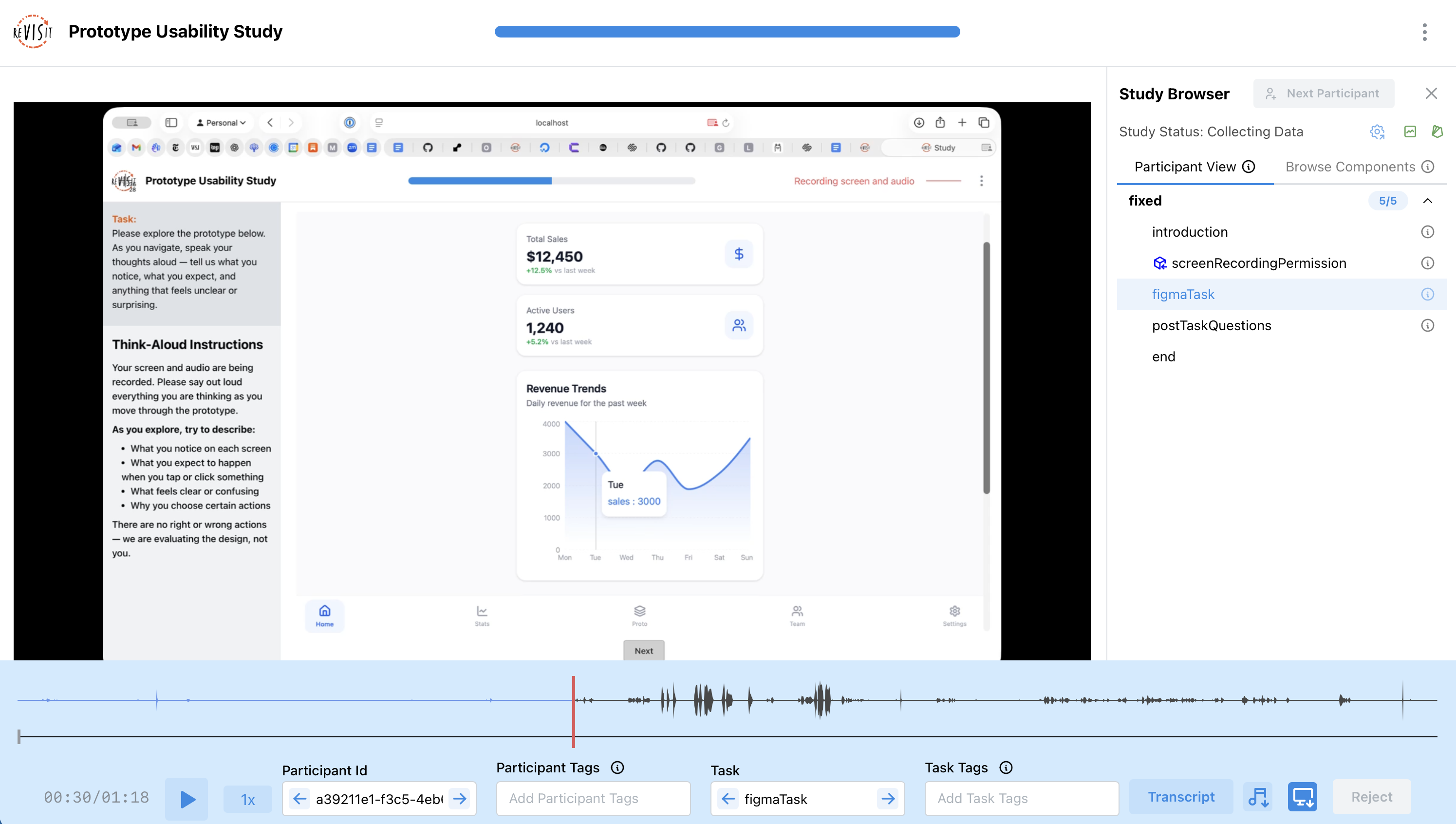
<p>Once participants complete the study, head to the reVISit analysis interface. The <strong><a href="https://revisit.dev/docs/analysis/participant-replay/" target="_blank" rel="noopener noreferrer" class="">Participant Replay</a></strong> view lets you watch each participant's screen recording with their think-aloud audio synchronized on a timeline — so you can see exactly where they hesitated, backtracked, or expressed confusion.</p>
<p>For deeper qualitative analysis, the <strong><a href="https://revisit.dev/docs/analysis/coding/" target="_blank" rel="noopener noreferrer" class="">Qualitative Coding</a></strong> interface displays auto-transcribed think-aloud text for each participant and task, lets you correct transcriptions, and supports creating and applying codebooks to surface recurring themes across your dataset.</p>
<p><img decoding="async" loading="lazy" alt="The Participant Replay interface showing a recording of a participant navigating the Figma prototype in the main pane, with the audio waveform timeline running along the bottom of the player. The qualitative coding panel is open on the right, displaying the auto-transcribed think-aloud text with analyst annotations applied." src="https://revisit.dev/PR232/assets/images/figma-3-862690628d7ab0d1a1b597d93e3f3f2e.png" width="2964" height="1674" class="img_ev3q"></p>
<h2 class="anchor anchorTargetStickyNavbar_Vzrq" id="putting-it-all-together">Putting it All Together<a href="https://revisit.dev/PR232/blog/2026/02/21/figma-prototype-testing/#putting-it-all-together" class="hash-link" aria-label="Direct link to Putting it All Together" title="Direct link to Putting it All Together" translate="no">​</a></h2>
<p>Here is a complete, ready-to-use config. The only change you need to make is swapping in your Figma embed URL for the <code>path</code> value in <code>figmaTask</code>:</p>
<div class="language-json codeBlockContainer_Ckt0 theme-code-block" style="--prism-color:#393A34;--prism-background-color:#f6f8fa"><div class="codeBlockContent_QJqH"><pre tabindex="0" class="prism-code language-json codeBlock_bY9V thin-scrollbar" style="color:#393A34;background-color:#f6f8fa"><code class="codeBlockLines_e6Vv"><span class="token-line" style="color:#393A34"><span class="token punctuation" style="color:#393A34">{</span><span class="token plain"></span><br></span><span class="token-line" style="color:#393A34"><span class="token plain">  </span><span class="token property" style="color:#36acaa">"$schema"</span><span class="token operator" style="color:#393A34">:</span><span class="token plain"> </span><span class="token string" style="color:#e3116c">"https://raw.githubusercontent.com/revisit-studies/study/main/src/parser/StudyConfigSchema.json"</span><span class="token punctuation" style="color:#393A34">,</span><span class="token plain"></span><br></span><span class="token-line" style="color:#393A34"><span class="token plain">  </span><span class="token property" style="color:#36acaa">"studyMetadata"</span><span class="token operator" style="color:#393A34">:</span><span class="token plain"> </span><span class="token punctuation" style="color:#393A34">{</span><span class="token plain"></span><br></span><span class="token-line" style="color:#393A34"><span class="token plain">    </span><span class="token property" style="color:#36acaa">"title"</span><span class="token operator" style="color:#393A34">:</span><span class="token plain"> </span><span class="token string" style="color:#e3116c">"Prototype Usability Study"</span><span class="token punctuation" style="color:#393A34">,</span><span class="token plain"></span><br></span><span class="token-line" style="color:#393A34"><span class="token plain">    </span><span class="token property" style="color:#36acaa">"version"</span><span class="token operator" style="color:#393A34">:</span><span class="token plain"> </span><span class="token string" style="color:#e3116c">"pilot"</span><span class="token punctuation" style="color:#393A34">,</span><span class="token plain"></span><br></span><span class="token-line" style="color:#393A34"><span class="token plain">    </span><span class="token property" style="color:#36acaa">"authors"</span><span class="token operator" style="color:#393A34">:</span><span class="token plain"> </span><span class="token punctuation" style="color:#393A34">[</span><span class="token string" style="color:#e3116c">"Your Name"</span><span class="token punctuation" style="color:#393A34">]</span><span class="token punctuation" style="color:#393A34">,</span><span class="token plain"></span><br></span><span class="token-line" style="color:#393A34"><span class="token plain">    </span><span class="token property" style="color:#36acaa">"date"</span><span class="token operator" style="color:#393A34">:</span><span class="token plain"> </span><span class="token string" style="color:#e3116c">"2026-02-21"</span><span class="token punctuation" style="color:#393A34">,</span><span class="token plain"></span><br></span><span class="token-line" style="color:#393A34"><span class="token plain">    </span><span class="token property" style="color:#36acaa">"description"</span><span class="token operator" style="color:#393A34">:</span><span class="token plain"> </span><span class="token string" style="color:#e3116c">"A think-aloud usability study with screen and audio recording."</span><span class="token punctuation" style="color:#393A34">,</span><span class="token plain"></span><br></span><span class="token-line" style="color:#393A34"><span class="token plain">    </span><span class="token property" style="color:#36acaa">"organizations"</span><span class="token operator" style="color:#393A34">:</span><span class="token plain"> </span><span class="token punctuation" style="color:#393A34">[</span><span class="token string" style="color:#e3116c">"Your Institution"</span><span class="token punctuation" style="color:#393A34">]</span><span class="token plain"></span><br></span><span class="token-line" style="color:#393A34"><span class="token plain">  </span><span class="token punctuation" style="color:#393A34">}</span><span class="token punctuation" style="color:#393A34">,</span><span class="token plain"></span><br></span><span class="token-line" style="color:#393A34"><span class="token plain">  </span><span class="token property" style="color:#36acaa">"uiConfig"</span><span class="token operator" style="color:#393A34">:</span><span class="token plain"> </span><span class="token punctuation" style="color:#393A34">{</span><span class="token plain"></span><br></span><span class="token-line" style="color:#393A34"><span class="token plain">    </span><span class="token property" style="color:#36acaa">"contactEmail"</span><span class="token operator" style="color:#393A34">:</span><span class="token plain"> </span><span class="token string" style="color:#e3116c">"your@email.com"</span><span class="token punctuation" style="color:#393A34">,</span><span class="token plain"></span><br></span><span class="token-line" style="color:#393A34"><span class="token plain">    </span><span class="token property" style="color:#36acaa">"withProgressBar"</span><span class="token operator" style="color:#393A34">:</span><span class="token plain"> </span><span class="token boolean" style="color:#36acaa">true</span><span class="token punctuation" style="color:#393A34">,</span><span class="token plain"></span><br></span><span class="token-line" style="color:#393A34"><span class="token plain">    </span><span class="token property" style="color:#36acaa">"withSidebar"</span><span class="token operator" style="color:#393A34">:</span><span class="token plain"> </span><span class="token boolean" style="color:#36acaa">true</span><span class="token punctuation" style="color:#393A34">,</span><span class="token plain"></span><br></span><span class="token-line" style="color:#393A34"><span class="token plain">    </span><span class="token property" style="color:#36acaa">"recordAudio"</span><span class="token operator" style="color:#393A34">:</span><span class="token plain"> </span><span class="token boolean" style="color:#36acaa">true</span><span class="token punctuation" style="color:#393A34">,</span><span class="token plain"></span><br></span><span class="token-line" style="color:#393A34"><span class="token plain">    </span><span class="token property" style="color:#36acaa">"recordScreen"</span><span class="token operator" style="color:#393A34">:</span><span class="token plain"> </span><span class="token boolean" style="color:#36acaa">true</span><span class="token plain"></span><br></span><span class="token-line" style="color:#393A34"><span class="token plain">  </span><span class="token punctuation" style="color:#393A34">}</span><span class="token punctuation" style="color:#393A34">,</span><span class="token plain"></span><br></span><span class="token-line" style="color:#393A34"><span class="token plain">  </span><span class="token property" style="color:#36acaa">"importedLibraries"</span><span class="token operator" style="color:#393A34">:</span><span class="token plain"> </span><span class="token punctuation" style="color:#393A34">[</span><span class="token string" style="color:#e3116c">"screen-recording"</span><span class="token punctuation" style="color:#393A34">]</span><span class="token punctuation" style="color:#393A34">,</span><span class="token plain"></span><br></span><span class="token-line" style="color:#393A34"><span class="token plain">  </span><span class="token property" style="color:#36acaa">"components"</span><span class="token operator" style="color:#393A34">:</span><span class="token plain"> </span><span class="token punctuation" style="color:#393A34">{</span><span class="token plain"></span><br></span><span class="token-line" style="color:#393A34"><span class="token plain">    </span><span class="token property" style="color:#36acaa">"introduction"</span><span class="token operator" style="color:#393A34">:</span><span class="token plain"> </span><span class="token punctuation" style="color:#393A34">{</span><span class="token plain"></span><br></span><span class="token-line" style="color:#393A34"><span class="token plain">      </span><span class="token property" style="color:#36acaa">"type"</span><span class="token operator" style="color:#393A34">:</span><span class="token plain"> </span><span class="token string" style="color:#e3116c">"markdown"</span><span class="token punctuation" style="color:#393A34">,</span><span class="token plain"></span><br></span><span class="token-line" style="color:#393A34"><span class="token plain">      </span><span class="token property" style="color:#36acaa">"path"</span><span class="token operator" style="color:#393A34">:</span><span class="token plain"> </span><span class="token string" style="color:#e3116c">"&lt;PATH_TO_YOUR_INTRODUCTION.md&gt;"</span><span class="token punctuation" style="color:#393A34">,</span><span class="token plain"></span><br></span><span class="token-line" style="color:#393A34"><span class="token plain">      </span><span class="token property" style="color:#36acaa">"response"</span><span class="token operator" style="color:#393A34">:</span><span class="token plain"> </span><span class="token punctuation" style="color:#393A34">[</span><span class="token punctuation" style="color:#393A34">]</span><span class="token plain"></span><br></span><span class="token-line" style="color:#393A34"><span class="token plain">    </span><span class="token punctuation" style="color:#393A34">}</span><span class="token punctuation" style="color:#393A34">,</span><span class="token plain"></span><br></span><span class="token-line" style="color:#393A34"><span class="token plain">    </span><span class="token property" style="color:#36acaa">"figmaTask"</span><span class="token operator" style="color:#393A34">:</span><span class="token plain"> </span><span class="token punctuation" style="color:#393A34">{</span><span class="token plain"></span><br></span><span class="token-line" style="color:#393A34"><span class="token plain">      </span><span class="token property" style="color:#36acaa">"type"</span><span class="token operator" style="color:#393A34">:</span><span class="token plain"> </span><span class="token string" style="color:#e3116c">"website"</span><span class="token punctuation" style="color:#393A34">,</span><span class="token plain"></span><br></span><span class="token-line" style="color:#393A34"><span class="token plain">      </span><span class="token property" style="color:#36acaa">"recordAudio"</span><span class="token operator" style="color:#393A34">:</span><span class="token plain"> </span><span class="token boolean" style="color:#36acaa">true</span><span class="token punctuation" style="color:#393A34">,</span><span class="token plain"></span><br></span><span class="token-line" style="color:#393A34"><span class="token plain">      </span><span class="token property" style="color:#36acaa">"recordScreen"</span><span class="token operator" style="color:#393A34">:</span><span class="token plain"> </span><span class="token boolean" style="color:#36acaa">true</span><span class="token punctuation" style="color:#393A34">,</span><span class="token plain"></span><br></span><span class="token-line" style="color:#393A34"><span class="token plain">      </span><span class="token property" style="color:#36acaa">"path"</span><span class="token operator" style="color:#393A34">:</span><span class="token plain"> </span><span class="token string" style="color:#e3116c">"https://embed.figma.com/proto/&lt;YOUR_FILE_ID&gt;/&lt;PROTOTYPE_NAME&gt;?node-id=...&amp;scaling=min-zoom&amp;embed-host=share"</span><span class="token punctuation" style="color:#393A34">,</span><span class="token plain"></span><br></span><span class="token-line" style="color:#393A34"><span class="token plain">      </span><span class="token property" style="color:#36acaa">"instruction"</span><span class="token operator" style="color:#393A34">:</span><span class="token plain"> </span><span class="token string" style="color:#e3116c">"Please explore the prototype below. As you navigate, speak your thoughts aloud — tell us what you notice, what you expect, and anything that feels unclear or surprising."</span><span class="token punctuation" style="color:#393A34">,</span><span class="token plain"></span><br></span><span class="token-line" style="color:#393A34"><span class="token plain">      </span><span class="token property" style="color:#36acaa">"response"</span><span class="token operator" style="color:#393A34">:</span><span class="token plain"> </span><span class="token punctuation" style="color:#393A34">[</span><span class="token plain"></span><br></span><span class="token-line" style="color:#393A34"><span class="token plain">        </span><span class="token punctuation" style="color:#393A34">{</span><span class="token plain"></span><br></span><span class="token-line" style="color:#393A34"><span class="token plain">          </span><span class="token property" style="color:#36acaa">"id"</span><span class="token operator" style="color:#393A34">:</span><span class="token plain"> </span><span class="token string" style="color:#e3116c">"think-aloud-instructions"</span><span class="token punctuation" style="color:#393A34">,</span><span class="token plain"></span><br></span><span class="token-line" style="color:#393A34"><span class="token plain">          </span><span class="token property" style="color:#36acaa">"type"</span><span class="token operator" style="color:#393A34">:</span><span class="token plain"> </span><span class="token string" style="color:#e3116c">"textOnly"</span><span class="token punctuation" style="color:#393A34">,</span><span class="token plain"></span><br></span><span class="token-line" style="color:#393A34"><span class="token plain">          </span><span class="token property" style="color:#36acaa">"location"</span><span class="token operator" style="color:#393A34">:</span><span class="token plain"> </span><span class="token string" style="color:#e3116c">"sidebar"</span><span class="token punctuation" style="color:#393A34">,</span><span class="token plain"></span><br></span><span class="token-line" style="color:#393A34"><span class="token plain">          </span><span class="token property" style="color:#36acaa">"prompt"</span><span class="token operator" style="color:#393A34">:</span><span class="token plain"> </span><span class="token string" style="color:#e3116c">"### Think-Aloud Instructions\n\nYour screen and audio are being recorded. Please say out loud everything you are thinking as you move through the prototype.\n\n**As you explore, try to describe:**\n\n- What you notice on each screen\n- What you expect to happen when you tap or click something\n- What feels clear or confusing\n- Why you choose certain actions\n\nThere are no right or wrong actions — we are evaluating the design, not you."</span><span class="token plain"></span><br></span><span class="token-line" style="color:#393A34"><span class="token plain">        </span><span class="token punctuation" style="color:#393A34">}</span><span class="token plain"></span><br></span><span class="token-line" style="color:#393A34"><span class="token plain">      </span><span class="token punctuation" style="color:#393A34">]</span><span class="token plain"></span><br></span><span class="token-line" style="color:#393A34"><span class="token plain">    </span><span class="token punctuation" style="color:#393A34">}</span><span class="token punctuation" style="color:#393A34">,</span><span class="token plain"></span><br></span><span class="token-line" style="color:#393A34"><span class="token plain">    </span><span class="token property" style="color:#36acaa">"postTaskQuestions"</span><span class="token operator" style="color:#393A34">:</span><span class="token plain"> </span><span class="token punctuation" style="color:#393A34">{</span><span class="token plain"></span><br></span><span class="token-line" style="color:#393A34"><span class="token plain">      </span><span class="token property" style="color:#36acaa">"type"</span><span class="token operator" style="color:#393A34">:</span><span class="token plain"> </span><span class="token string" style="color:#e3116c">"questionnaire"</span><span class="token punctuation" style="color:#393A34">,</span><span class="token plain"></span><br></span><span class="token-line" style="color:#393A34"><span class="token plain">      </span><span class="token property" style="color:#36acaa">"recordAudio"</span><span class="token operator" style="color:#393A34">:</span><span class="token plain"> </span><span class="token boolean" style="color:#36acaa">true</span><span class="token punctuation" style="color:#393A34">,</span><span class="token plain"></span><br></span><span class="token-line" style="color:#393A34"><span class="token plain">      </span><span class="token property" style="color:#36acaa">"response"</span><span class="token operator" style="color:#393A34">:</span><span class="token plain"> </span><span class="token punctuation" style="color:#393A34">[</span><span class="token plain"></span><br></span><span class="token-line" style="color:#393A34"><span class="token plain">        </span><span class="token punctuation" style="color:#393A34">{</span><span class="token plain"></span><br></span><span class="token-line" style="color:#393A34"><span class="token plain">          </span><span class="token property" style="color:#36acaa">"id"</span><span class="token operator" style="color:#393A34">:</span><span class="token plain"> </span><span class="token string" style="color:#e3116c">"satisfaction"</span><span class="token punctuation" style="color:#393A34">,</span><span class="token plain"></span><br></span><span class="token-line" style="color:#393A34"><span class="token plain">          </span><span class="token property" style="color:#36acaa">"prompt"</span><span class="token operator" style="color:#393A34">:</span><span class="token plain"> </span><span class="token string" style="color:#e3116c">"Rate your satisfaction with the following aspects of the prototype."</span><span class="token punctuation" style="color:#393A34">,</span><span class="token plain"></span><br></span><span class="token-line" style="color:#393A34"><span class="token plain">          </span><span class="token property" style="color:#36acaa">"location"</span><span class="token operator" style="color:#393A34">:</span><span class="token plain"> </span><span class="token string" style="color:#e3116c">"aboveStimulus"</span><span class="token punctuation" style="color:#393A34">,</span><span class="token plain"></span><br></span><span class="token-line" style="color:#393A34"><span class="token plain">          </span><span class="token property" style="color:#36acaa">"type"</span><span class="token operator" style="color:#393A34">:</span><span class="token plain"> </span><span class="token string" style="color:#e3116c">"matrix-radio"</span><span class="token punctuation" style="color:#393A34">,</span><span class="token plain"></span><br></span><span class="token-line" style="color:#393A34"><span class="token plain">          </span><span class="token property" style="color:#36acaa">"answerOptions"</span><span class="token operator" style="color:#393A34">:</span><span class="token plain"> </span><span class="token string" style="color:#e3116c">"satisfaction5"</span><span class="token punctuation" style="color:#393A34">,</span><span class="token plain"></span><br></span><span class="token-line" style="color:#393A34"><span class="token plain">          </span><span class="token property" style="color:#36acaa">"questionOptions"</span><span class="token operator" style="color:#393A34">:</span><span class="token plain"> </span><span class="token punctuation" style="color:#393A34">[</span><span class="token plain"></span><br></span><span class="token-line" style="color:#393A34"><span class="token plain">            </span><span class="token string" style="color:#e3116c">"Overall Design"</span><span class="token punctuation" style="color:#393A34">,</span><span class="token plain"></span><br></span><span class="token-line" style="color:#393A34"><span class="token plain">            </span><span class="token string" style="color:#e3116c">"Ease of Navigation"</span><span class="token punctuation" style="color:#393A34">,</span><span class="token plain"></span><br></span><span class="token-line" style="color:#393A34"><span class="token plain">            </span><span class="token string" style="color:#e3116c">"Visual Clarity"</span><span class="token punctuation" style="color:#393A34">,</span><span class="token plain"></span><br></span><span class="token-line" style="color:#393A34"><span class="token plain">            </span><span class="token string" style="color:#e3116c">"Completeness of Information"</span><span class="token plain"></span><br></span><span class="token-line" style="color:#393A34"><span class="token plain">          </span><span class="token punctuation" style="color:#393A34">]</span><span class="token plain"></span><br></span><span class="token-line" style="color:#393A34"><span class="token plain">        </span><span class="token punctuation" style="color:#393A34">}</span><span class="token punctuation" style="color:#393A34">,</span><span class="token plain"></span><br></span><span class="token-line" style="color:#393A34"><span class="token plain">        </span><span class="token punctuation" style="color:#393A34">{</span><span class="token plain"></span><br></span><span class="token-line" style="color:#393A34"><span class="token plain">          </span><span class="token property" style="color:#36acaa">"id"</span><span class="token operator" style="color:#393A34">:</span><span class="token plain"> </span><span class="token string" style="color:#e3116c">"open-feedback"</span><span class="token punctuation" style="color:#393A34">,</span><span class="token plain"></span><br></span><span class="token-line" style="color:#393A34"><span class="token plain">          </span><span class="token property" style="color:#36acaa">"prompt"</span><span class="token operator" style="color:#393A34">:</span><span class="token plain"> </span><span class="token string" style="color:#e3116c">"What stood out most during your exploration — positive or negative?"</span><span class="token punctuation" style="color:#393A34">,</span><span class="token plain"></span><br></span><span class="token-line" style="color:#393A34"><span class="token plain">          </span><span class="token property" style="color:#36acaa">"location"</span><span class="token operator" style="color:#393A34">:</span><span class="token plain"> </span><span class="token string" style="color:#e3116c">"aboveStimulus"</span><span class="token punctuation" style="color:#393A34">,</span><span class="token plain"></span><br></span><span class="token-line" style="color:#393A34"><span class="token plain">          </span><span class="token property" style="color:#36acaa">"type"</span><span class="token operator" style="color:#393A34">:</span><span class="token plain"> </span><span class="token string" style="color:#e3116c">"longText"</span><span class="token punctuation" style="color:#393A34">,</span><span class="token plain"></span><br></span><span class="token-line" style="color:#393A34"><span class="token plain">          </span><span class="token property" style="color:#36acaa">"placeholder"</span><span class="token operator" style="color:#393A34">:</span><span class="token plain"> </span><span class="token string" style="color:#e3116c">"Share your thoughts here..."</span><span class="token plain"></span><br></span><span class="token-line" style="color:#393A34"><span class="token plain">        </span><span class="token punctuation" style="color:#393A34">}</span><span class="token plain"></span><br></span><span class="token-line" style="color:#393A34"><span class="token plain">      </span><span class="token punctuation" style="color:#393A34">]</span><span class="token plain"></span><br></span><span class="token-line" style="color:#393A34"><span class="token plain">    </span><span class="token punctuation" style="color:#393A34">}</span><span class="token plain"></span><br></span><span class="token-line" style="color:#393A34"><span class="token plain">  </span><span class="token punctuation" style="color:#393A34">}</span><span class="token punctuation" style="color:#393A34">,</span><span class="token plain"></span><br></span><span class="token-line" style="color:#393A34"><span class="token plain">  </span><span class="token property" style="color:#36acaa">"sequence"</span><span class="token operator" style="color:#393A34">:</span><span class="token plain"> </span><span class="token punctuation" style="color:#393A34">{</span><span class="token plain"></span><br></span><span class="token-line" style="color:#393A34"><span class="token plain">    </span><span class="token property" style="color:#36acaa">"order"</span><span class="token operator" style="color:#393A34">:</span><span class="token plain"> </span><span class="token string" style="color:#e3116c">"fixed"</span><span class="token punctuation" style="color:#393A34">,</span><span class="token plain"></span><br></span><span class="token-line" style="color:#393A34"><span class="token plain">    </span><span class="token property" style="color:#36acaa">"components"</span><span class="token operator" style="color:#393A34">:</span><span class="token plain"> </span><span class="token punctuation" style="color:#393A34">[</span><span class="token plain"></span><br></span><span class="token-line" style="color:#393A34"><span class="token plain">      </span><span class="token string" style="color:#e3116c">"introduction"</span><span class="token punctuation" style="color:#393A34">,</span><span class="token plain"></span><br></span><span class="token-line" style="color:#393A34"><span class="token plain">      </span><span class="token string" style="color:#e3116c">"$screen-recording.co.screenRecordingPermission"</span><span class="token punctuation" style="color:#393A34">,</span><span class="token plain"></span><br></span><span class="token-line" style="color:#393A34"><span class="token plain">      </span><span class="token string" style="color:#e3116c">"figmaTask"</span><span class="token punctuation" style="color:#393A34">,</span><span class="token plain"></span><br></span><span class="token-line" style="color:#393A34"><span class="token plain">      </span><span class="token string" style="color:#e3116c">"postTaskQuestions"</span><span class="token plain"></span><br></span><span class="token-line" style="color:#393A34"><span class="token plain">    </span><span class="token punctuation" style="color:#393A34">]</span><span class="token plain"></span><br></span><span class="token-line" style="color:#393A34"><span class="token plain">  </span><span class="token punctuation" style="color:#393A34">}</span><span class="token plain"></span><br></span><span class="token-line" style="color:#393A34"><span class="token plain"></span><span class="token punctuation" style="color:#393A34">}</span><br></span></code></pre></div></div>
<h2 class="anchor anchorTargetStickyNavbar_Vzrq" id="next-steps">Next Steps<a href="https://revisit.dev/PR232/blog/2026/02/21/figma-prototype-testing/#next-steps" class="hash-link" aria-label="Direct link to Next Steps" title="Direct link to Next Steps" translate="no">​</a></h2>
<p>To learn more, check out the <a href="https://revisit.dev/docs/designing-studies/record-screen/" target="_blank" rel="noopener noreferrer" class="">Screen Recording setup guide</a> and the <a href="https://revisit.dev/docs/designing-studies/think-aloud/" target="_blank" rel="noopener noreferrer" class="">Think-Aloud documentation</a>. If you have questions or want to share what you build, come find us in the <a href="https://revisit-nsf.slack.com/join/shared_invite/zt-25mrh5ppi-6sDAL6HqcWJh_uvt2~~DMQ" target="_blank" rel="noopener noreferrer" class="">reVISit Slack</a>. We'd love to see what kinds of prototypes you put to the test.</p>]]></content>
        <author>
            <name>Lane Harrison</name>
            <uri>https://web.cs.wpi.edu/~ltharrison/</uri>
        </author>
    </entry>
    <entry>
        <title type="html"><![CDATA[ReVISit 2 Paper Wins Best Paper Award at IEEE VIS]]></title>
        <id>https://revisit.dev/PR232/blog/2025/11/10/ieee-vis-award/</id>
        <link href="https://revisit.dev/PR232/blog/2025/11/10/ieee-vis-award/"/>
        <updated>2025-11-10T00:00:00.000Z</updated>
        <summary type="html"><![CDATA[We’re happy to share that our paper on reVISit 2 received a Best Paper Award at IEEE VIS 2025. ReVISit 2 is an open framework for designing, deploying, and disseminating browser-based visualization studies across the full experiment life cycle. In this post, we summarize the contributions of the paper, describe the replication studies that demonstrate the system’s capabilities, reflect on feedback from users, and outline how reVISit can support more reproducible and expressive experimental research.]]></summary>
        <content type="html"><![CDATA[<p>We’re happy to share that our paper on reVISit 2 received a Best Paper Award at IEEE VIS 2025. ReVISit 2 is an open framework for designing, deploying, and disseminating browser-based visualization studies across the full experiment life cycle. In this post, we summarize the contributions of the paper, describe the replication studies that demonstrate the system’s capabilities, reflect on feedback from users, and outline how reVISit can support more reproducible and expressive experimental research.</p>
<p><img decoding="async" loading="lazy" alt="Selfie by the reVISit team on stage at IEEE VIS in Vienna after receiving the award." src="https://revisit.dev/PR232/assets/images/award_photo-148cfcfa79afdbc34035e98dad90bc27.jpg" width="1440" height="978" class="img_ev3q"></p>
<p>Running online visualization studies is now standard practice in VIS and HCI research. Yet the process remains fragmented: researchers stitch together survey tools, custom web code, logging scripts, analysis pipelines, and ad hoc debugging workflows. Users of <a href="https://revisit.dev/" target="_blank" rel="noopener noreferrer" class="">reVISit</a> already know this story: reVISit consolidates this ecosystem into a single open framework that supports the <strong>entire experiment life cycle</strong> – from design to dissemination.</p>
<p>To inform the academic community about the new developments in reVISit 2 – which we already described in these <a href="https://revisit.dev/blog/2025/01/20/release-2.0/" target="_blank" rel="noopener noreferrer" class="">blog</a> <a href="https://revisit.dev/blog/2025/10/27/release-2.3/" target="_blank" rel="noopener noreferrer" class="">posts</a>  we wrote an <a href="https://www.visdesignlab.net/publications/2025_vis_revisit/" target="_blank" rel="noopener noreferrer" class="">academic paper</a> about it.</p>
<h2 class="anchor anchorTargetStickyNavbar_Vzrq" id="positioning-revisit-in-the-ecosystem">Positioning reVISit in the Ecosystem<a href="https://revisit.dev/PR232/blog/2025/11/10/ieee-vis-award/#positioning-revisit-in-the-ecosystem" class="hash-link" aria-label="Direct link to Positioning reVISit in the Ecosystem" title="Direct link to Positioning reVISit in the Ecosystem" translate="no">​</a></h2>
<p>In the paper, we first situate reVISit among existing study platforms. We compare it to commercial survey systems, domain-specific research tools, and library-based frameworks. While survey platforms excel at rapid deployment, they rarely support sophisticated interaction logging or fine-grained experimental control. Academic tools often address specific domains or slices of the workflow, but lack long-term maintainability or broad adoption.</p>
<p>ReVISit 2 is designed differently: it treats experiment design as programmable infrastructure. A JSON-based domain-specific language (DSL) models sequences, blocks, counterbalancing strategies, interruptions, skip logic, and dynamic control flow. On top of that, reVISitPy provides Python bindings that allow researchers to generate complex study configurations directly from notebooks. <strong>The result is a framework that emphasizes expressiveness, reproducibility, and ownership over one’s experimental stack.</strong></p>
<p>We also describe technical advances in reVISit 2, including first-class Vega support, automated provenance tracking, participant replay, and improved debugging tools such as the study browser. These features aim to tighten feedback loops during piloting while preserving transparency during dissemination.</p>
<h2 class="anchor anchorTargetStickyNavbar_Vzrq" id="putting-it-to-the-test-replication-studies">Putting it to the Test: Replication Studies<a href="https://revisit.dev/PR232/blog/2025/11/10/ieee-vis-award/#putting-it-to-the-test-replication-studies" class="hash-link" aria-label="Direct link to Putting it to the Test: Replication Studies" title="Direct link to Putting it to the Test: Replication Studies" translate="no">​</a></h2>
<p>To demonstrate that these capabilities are not merely architectural, we conducted a series of replication studies.</p>
<p><img decoding="async" loading="lazy" alt="Screenshot of the revisit analysis interface showing a replay of an interactive study with think aloud and provenance tracking. A large bubble chart is the main stimulus." src="https://revisit.dev/PR232/assets/images/bubble_chart-6202f30edf0943dd80c8423155185d2f.png" width="3438" height="1796" class="img_ev3q"></p>
<p>Each study highlights a different capability of the system. In one, we implement adaptive and staircase-style designs to <a href="https://revisit.dev/replication-studies/?tab=JND" target="_blank" rel="noopener noreferrer" class="">evaluate visualizations of correlations</a> using <a href="https://revisit.dev/docs/typedoc/interfaces/DynamicBlock/" target="_blank" rel="noopener noreferrer" class="">dynamic sequencing logic</a>, showing how complex control flow can be expressed directly in the study configuration. In another, we integrate <a href="https://revisit.dev/docs/designing-studies/think-aloud/" target="_blank" rel="noopener noreferrer" class="">think-aloud protocols</a> by embedding audio recording and transcription into browser-based experiments, allowing <a href="https://revisit.dev/replication-studies/?tab=Search" target="_blank" rel="noopener noreferrer" class="">researchers to capture reasoning during interaction</a> rather than only after the fact. Finally, we demonstrate <a href="https://revisit.dev/replication-studies/?tab=Pattern" target="_blank" rel="noopener noreferrer" class="">provenance tracking and replay</a> by instrumenting interactive visualizations to capture detailed interaction histories, enabling fine-grained participant replay and qualitative analysis. reVISit 2 also provides deep linking to specific trials or moments in user studies, to aid in dissemination and transparency. For example, <a href="https://revisit.dev/replication-studies/bubblechart-study/LzE2MTl4ZVRMTk5nSFlNYmd1ZDhjZz09?participantId=936e6c58-fc6e-4e1f-9af9-9c9ce2a65952" target="_blank" rel="noopener noreferrer" class="">this link</a> takes you to the exact state you see in the above image.</p>
<p>Across these replications, we recruited hundreds of participants and reproduced key findings from prior visualization studies. Just as importantly, the studies surfaced practical lessons about counterbalancing, recruitment logistics, and the realities of deploying sophisticated designs online. Together, they function both as validation and as a stress test of the framework. <strong>They also remain publicly accessible – complete with study configurations and data – serving as concrete, real-world examples that the community can inspect, reuse, and learn from.</strong></p>
<h2 class="anchor anchorTargetStickyNavbar_Vzrq" id="what-users-told-us">What Users Told Us<a href="https://revisit.dev/PR232/blog/2025/11/10/ieee-vis-award/#what-users-told-us" class="hash-link" aria-label="Direct link to What Users Told Us" title="Direct link to What Users Told Us" translate="no">​</a></h2>
<p>We also interviewed experienced reVISit users to better understand how the system performs in practice. Several themes emerged:</p>
<ul>
<li class=""><strong>Tighter development loops.</strong> Users appreciated the integrated development environment and the study browser, which makes it possible to jump directly to specific trials without stepping through an entire study.</li>
<li class=""><strong>Expressiveness over convenience.</strong> While the DSL requires programming knowledge, users valued the flexibility it affords – especially for mixed designs and adaptive sequencing.</li>
<li class=""><strong>Learning curve trade-offs.</strong> ReVISit inherits complexity from modern web tooling (e.g., React, TypeScript). This can be a barrier for less technical researchers, but it also enables deeper customization and extensibility.</li>
<li class=""><strong>Open infrastructure.</strong> The ability to fork studies, inspect core code, and maintain version stability was frequently cited as a strength, particularly for reproducibility.</li>
</ul>
<p>Overall, feedback confirmed that reVISit is most effective for technically oriented research teams who need more than a survey builder.</p>
<h2 class="anchor anchorTargetStickyNavbar_Vzrq" id="recognition-at-ieee-vis">Recognition at IEEE VIS<a href="https://revisit.dev/PR232/blog/2025/11/10/ieee-vis-award/#recognition-at-ieee-vis" class="hash-link" aria-label="Direct link to Recognition at IEEE VIS" title="Direct link to Recognition at IEEE VIS" translate="no">​</a></h2>
<p>We were very honored to receive an <a href="https://ieeevis.org/year/2025/info/awards/best-paper-awards#:~:text=ReVISit%202%3A%20A%20Full%20Experiment%20Life%20Cycle%20User%20Study%20Framework" target="_blank" rel="noopener noreferrer" class=""><strong>IEEE VIS Best Paper Award</strong></a> for this work. Zach Cutler presented the paper on the main stage in Vienna.</p>
<p><img decoding="async" loading="lazy" alt="Zach Cutler presenting the paper at IEEE VIS in Vienna." src="https://revisit.dev/PR232/assets/images/zach_presenting-d041966ed7942734b9179a2ad4c3a688.jpg" width="1600" height="1205" class="img_ev3q"></p>
<p>This recognition reflects years of iterative development, community feedback, tutorials, documentation work, and, most importantly, the researchers who have trusted reVISit in their own studies.</p>
<p>ReVISit 2 is not the endpoint. It is infrastructure for a research community that increasingly relies on sophisticated, reproducible, browser-based experiments. We look forward to continuing to build it together.</p>]]></content>
        <author>
            <name>The ReVISit Team</name>
        </author>
    </entry>
    <entry>
        <title type="html"><![CDATA[ReVISit v2.3: Databases, Screen Capture, Qualitative Analysis, Styling, and More!]]></title>
        <id>https://revisit.dev/PR232/blog/2025/10/27/release-2.3/</id>
        <link href="https://revisit.dev/PR232/blog/2025/10/27/release-2.3/"/>
        <updated>2025-10-27T00:00:00.000Z</updated>
        <summary type="html"><![CDATA[Today we're announcing several new reVISit features that were released in versions 2.1, 2.2 and 2.3. Major new features include an option to self-host data, remote screen-capture, a collaborative qualitative coding interface, and other features and improvements we're excited to share. For full details on the changes, look at the GitHub releases!]]></summary>
        <content type="html"><![CDATA[<p>Today we're announcing several new reVISit features that were released in versions 2.1, 2.2 and 2.3. Major new features include an option to <strong>self-host data</strong>, <strong>remote screen-capture</strong>, a <strong>collaborative qualitative coding interface</strong>, and other features and improvements we're excited to share. For full details on the changes, <a href="https://github.com/revisit-studies/study/releases" target="_blank" rel="noopener noreferrer" class="">look at the GitHub releases!</a></p>
<h2 class="anchor anchorTargetStickyNavbar_Vzrq" id="supabase--a-self-hosted-alternative-to-firebase-beta">Supabase – A Self-Hosted Alternative to Firebase [Beta]<a href="https://revisit.dev/PR232/blog/2025/10/27/release-2.3/#supabase--a-self-hosted-alternative-to-firebase-beta" class="hash-link" aria-label="Direct link to Supabase – A Self-Hosted Alternative to Firebase [Beta]" title="Direct link to Supabase – A Self-Hosted Alternative to Firebase [Beta]" translate="no">​</a></h2>
<p>Maybe the biggest change is added support for Supabase, an open-source, self-hostable alternative to Firebase. Not all researchers can use products such as Firebase due to organizational or legal restrictions (GDPR, etc.). Supabase allows researchers with these restrictions to use reVISit inside an environment they fully control and own. Self-hosting is a bit more hands-on than using Firebase, so we make the setup as easy as possible by providing a docker-compose file to spin up Supabase on your own infrastructure. See <a href="https://revisit.dev/docs/data-and-deployment/supabase/setup/" target="_blank" rel="noopener noreferrer" class="">Supabase setup guide</a> to learn more.</p>
<p>Note: we ran a few studies with Supabase without issues, but we don’t have as much experience with it as we do with Firebase, so we're marking this feature as Beta until we have had more time to test with it.</p>
<h2 class="anchor anchorTargetStickyNavbar_Vzrq" id="screen-capture-beta">Screen Capture [Beta]<a href="https://revisit.dev/PR232/blog/2025/10/27/release-2.3/#screen-capture-beta" class="hash-link" aria-label="Direct link to Screen Capture [Beta]" title="Direct link to Screen Capture [Beta]" translate="no">​</a></h2>
<p>Since its initial release, reVISit has included <a href="https://revisit.dev/docs/designing-studies/provenance-tracking/" target="_blank" rel="noopener noreferrer" class="">provenance tracking</a>  using <a href="https://apps.vdl.sci.utah.edu/trrack" target="_blank" rel="noopener noreferrer" class="">Trrack</a>. Provenance tracking can be very helpful for replaying and analyzing exactly how users interact with stimuli. However, it can also be tedious to setup – especially for complex visualizations with multiple elements to track, or when working with visualizations you don’t control (e.g. <a href="https://revisit.dev/docs/typedoc/interfaces/WebsiteComponent/" target="_blank" rel="noopener noreferrer" class="">website components</a>).</p>
<p>So today we’re introducing a flexible alternative for capturing user behavior: screen recording. In your study, you now can ask participants to grant browser permissions to record their screen – much like screen sharing in video conferencing software – with recordings stored in the reVISit infrastructure. This approach offers a much lower barrier to setup compared to provenance tracking and can be enabled directly through the reVISit config – no coding required!</p>
<p>The video shows an example screen recording session that also includes audio recording in a think-aloud protocol.</p>
<iframe width="100%" height="450" src="https://www.youtube.com/embed/QMkObxCfxmE?si=NTZGUZTCCtZg5pE6" title="YouTube video player" frameborder="0" allow="accelerometer; autoplay; clipboard-write; encrypted-media; gyroscope; picture-in-picture; web-share" referrerpolicy="strict-origin-when-cross-origin"></iframe>
<p>We’re finding screen recording to be extremely useful for early-stage piloting, debugging, as well as conducting full studies. In fact, if you have other reVISit capabilities enabled, such as think-aloud or provenance tracking, the screen recording syncs properly with them, making it powerful to analyze provenance as participants experience it. See the <a href="https://revisit.dev/docs/designing-studies/record-screen/" target="_blank" rel="noopener noreferrer" class="">Screen recording setup guide</a> to learn more. As with Supabase, we’re marking this feature as Beta until we have had more time to test with it.</p>
<h2 class="anchor anchorTargetStickyNavbar_Vzrq" id="qualitative-coding-for-study-replays">Qualitative Coding for Study Replays<a href="https://revisit.dev/PR232/blog/2025/10/27/release-2.3/#qualitative-coding-for-study-replays" class="hash-link" aria-label="Direct link to Qualitative Coding for Study Replays" title="Direct link to Qualitative Coding for Study Replays" translate="no">​</a></h2>
<p>We’ve added a qualitative analysis and coding platform to pair with our participant analysis and replay. This implementation is based on what we described in our <a href="https://dl.acm.org/doi/10.1145/3706598.3714305" target="_blank" rel="noopener noreferrer" class="">CHI paper</a>, with extensive design improvements and additional functionality. The analysis displays the transcribed text for a participant and task, and allows users to edit the transcriptions as well as create and apply codebooks to the transcribed audio.</p>
<p>The video shows an example of audio and video captured in a visualization drawing task, with the researcher applying codes to segments of the transcript.</p>
<iframe width="100%" height="400" src="https://www.youtube.com/embed/Y-nUn0d8xrQ?si=1yqtoxRW3Ygij7nr" title="YouTube video player" frameborder="0" allow="accelerometer; autoplay; clipboard-write; encrypted-media; gyroscope; picture-in-picture; web-share" referrerpolicy="strict-origin-when-cross-origin"></iframe>
<p>Codes are available for download as part of the data export, making it easy to integrate qualitative coding into your analysis workflow.</p>
<h2 class="anchor anchorTargetStickyNavbar_Vzrq" id="styling-studies">Styling Studies<a href="https://revisit.dev/PR232/blog/2025/10/27/release-2.3/#styling-studies" class="hash-link" aria-label="Direct link to Styling Studies" title="Direct link to Styling Studies" translate="no">​</a></h2>
<p>We introduce new tools for customizing the look of the studies, making it easier to match your study’s design to your research goals. Whether you want to make your study polished or improve accessibility for participants, you can do it all directly with the styling options reVISit provides. Styling can be applied in multiple ways – from inline styles to external CSS files, depending on the level of customization you need.</p>
<p>Styles can be set at the global level for the whole study, at the component level for individual stimuli, or at the response (form element) level for specific questions.</p>
<p>With styles, you can get really into the design weeds. For instance, you can make reVISit feel deeply polished by adjusting the form style study, using clean layouts, different font sizes, and bordered responses. The video shows a study emulating Google Forms’ style:</p>
<p><img decoding="async" loading="lazy" src="https://revisit.dev/assets/images/style-form-954abe29730c080cb962668c93e4653c.gif" alt="formStyle" class="img_ev3q"></p>
<p>You can try it out and look at various other examples <a href="https://revisit.dev/study/demo-style/QStiN0cvR09ERmlPZzNWNDBFcFlKZz09" target="_blank" rel="noopener noreferrer" class="">here</a>.</p>
<p>Advanced styling can be applied to make studies more engaging. For example, responses can enlarge text as participants start typing or change background when clicked. These interactions make study more engaging, providing a more user-friendly experience.</p>
<p><img decoding="async" loading="lazy" src="https://revisit.dev/assets/images/style-interactive-7d184d9f19ab4208b8966bea135d5557.gif" alt="advancedStyle" class="img_ev3q"></p>
<p>Styling allows researchers to create clean, accessible, and enjoyable studies without complicated steps. To see more styling examples, check out the <a href="https://revisit.dev/docs/designing-studies/applying-style" target="_blank" rel="noopener noreferrer" class="">styling documentation</a>.</p>
<h2 class="anchor anchorTargetStickyNavbar_Vzrq" id="live-monitor-for-viewing-study-progress">Live Monitor for Viewing Study Progress<a href="https://revisit.dev/PR232/blog/2025/10/27/release-2.3/#live-monitor-for-viewing-study-progress" class="hash-link" aria-label="Direct link to Live Monitor for Viewing Study Progress" title="Direct link to Live Monitor for Viewing Study Progress" translate="no">​</a></h2>
<p>We added a new live monitor to the analytics interface. The monitor maintains a live connection to the database, and the moment participants answer a question, the heatmap and progress are updated automatically. This enables you to track participants’ progress without refreshing the page. For studies that have fixed-length trials, it displays all questions and marks answered questions in green. For studies that have dynamic components, it will show answered questions followed by a question mark since the total number of questions is not pre-determined.  Note that the live monitor is currently only supported in Firebase-based studies.</p>
<p>The video shows the live monitor in action: in the left video, a participant is taking the study, and on the right, the live monitor updates automatically as the participant answers questions. We show both, a static and a dynamic study example.</p>
<iframe width="100%" height="280" src="https://www.youtube.com/embed/hF_nVkJP4IY?si=KeMHr5Vfk5MOJNtS" title="YouTube video player" frameborder="0" allow="accelerometer; autoplay; clipboard-write; encrypted-media; gyroscope; picture-in-picture; web-share" referrerpolicy="strict-origin-when-cross-origin"></iframe>
<h2 class="anchor anchorTargetStickyNavbar_Vzrq" id="study-stages">Study Stages<a href="https://revisit.dev/PR232/blog/2025/10/27/release-2.3/#study-stages" class="hash-link" aria-label="Direct link to Study Stages" title="Direct link to Study Stages" translate="no">​</a></h2>
<p>A typical study goes through multiple stages, such as debugging by the developer, pre-pilots with friends and family; pilots with real participants and then finally the main study. In data analysis, you do want to keep these stages separate to avoid mixing pilot data with real data. To simplify this process, we introduce a new stage management feature.</p>
<p>You can now create stages and filter participants by their stage in the analysis interface. Stages are also prominently available in the data that you download from reVISit. By default, the study will be in the DEFAULT stage. Study designers can create new stages and give it a color, which will be assigned to new participants. In the table in the participant's view, we added a new column that displayed the stage name with corresponding color.</p>
<iframe width="100%" height="270" src="https://www.youtube.com/embed/bx6Sp_5SbMU?si=XTaMaKqRjP-Y9ogb" title="YouTube video player" frameborder="0" allow="accelerometer; autoplay; clipboard-write; encrypted-media; gyroscope; picture-in-picture; web-share" referrerpolicy="strict-origin-when-cross-origin"></iframe>
<h2 class="anchor anchorTargetStickyNavbar_Vzrq" id="advanced-control-over-study-flow-with-dynamic-sequence-blocks">Advanced Control Over Study Flow With Dynamic Sequence Blocks<a href="https://revisit.dev/PR232/blog/2025/10/27/release-2.3/#advanced-control-over-study-flow-with-dynamic-sequence-blocks" class="hash-link" aria-label="Direct link to Advanced Control Over Study Flow With Dynamic Sequence Blocks" title="Direct link to Advanced Control Over Study Flow With Dynamic Sequence Blocks" translate="no">​</a></h2>
<p>Dynamic blocks enable a study designer to build studies that require adaptive logic, i.e. the response to a question (e.g., right or wrong) can be used to determine the next (e.g., harder or easier) question.</p>
<p>You can check out a <a href="https://revisit.dev/study/demo-dynamic/" target="_blank" rel="noopener noreferrer" class="">simple demo</a> here, or look <a href="https://revisit.dev/replication-studies/" target="_blank" rel="noopener noreferrer" class="">at a real study on just noticeable differences of correlations we recently ran</a>.</p>
<p>To learn how to use the dynamic blocks in your studies, see the <a href="https://revisit.dev/docs/designing-studies/dynamic-blocks/" target="_blank" rel="noopener noreferrer" class="">documentation</a>.</p>
<h2 class="anchor anchorTargetStickyNavbar_Vzrq" id="study-summary-page">Study Summary Page<a href="https://revisit.dev/PR232/blog/2025/10/27/release-2.3/#study-summary-page" class="hash-link" aria-label="Direct link to Study Summary Page" title="Direct link to Study Summary Page" translate="no">​</a></h2>
<p>We introduce a study summary page in the analysis interface. This provides a comprehensive overview of the study data in a single dashboard. The summary is organized in three  sections – Overview Statistics, Component Statistics, and Response Statistics.</p>
<p><img decoding="async" loading="lazy" src="https://revisit.dev/assets/images/study-summary-2bffd9d623321af1cd057043e1e8af3a.png" alt="Screenshots of the study summary page showing overview stats, component stats and response stats." class="img_ev3q"></p>
<ul>
<li class=""><strong>Overview Statistics</strong> show key information about the study, such as the total number of participants, study timeframe, average time spent, and the overall correctness of the study.</li>
<li class=""><strong>Component Statistics</strong> give details about each component of the study, such as number of participants, average time spent, and correctness.</li>
<li class=""><strong>Response Statistics</strong> show response level information including response type, answer options, and correctness.</li>
</ul>
<p>This new summary page will help you understand participants' answers quickly. To learn more, please see the <a href="https://revisit.dev/docs/analysis/study-summary/" target="_blank" rel="noopener noreferrer" class="">documentation</a>.</p>
<h2 class="anchor anchorTargetStickyNavbar_Vzrq" id="new-libraries">New Libraries<a href="https://revisit.dev/PR232/blog/2025/10/27/release-2.3/#new-libraries" class="hash-link" aria-label="Direct link to New Libraries" title="Direct link to New Libraries" translate="no">​</a></h2>
<p>The reVISit libraries are a growing collection of predefined study components and validated questionnaires for visualization and HCI research. With just a few lines of code, you can import them directly into your study.</p>
<p>We are excited to introduce several new libraries:</p>
<h3 class="anchor anchorTargetStickyNavbar_Vzrq" id="virtual-chinrest-calibration-library">Virtual Chinrest Calibration Library<a href="https://revisit.dev/PR232/blog/2025/10/27/release-2.3/#virtual-chinrest-calibration-library" class="hash-link" aria-label="Direct link to Virtual Chinrest Calibration Library" title="Direct link to Virtual Chinrest Calibration Library" translate="no">​</a></h3>
<p>A <a href="https://www.nature.com/articles/s41598-019-57204-1" target="_blank" rel="noopener noreferrer" class="">virtual chinrest</a> can be used to measure the distance between a participant and their monitor by detecting their blind spot. This <a href="https://revisit.dev/study/library-virtual-chinrest/" target="_blank" rel="noopener noreferrer" class="">reVISit library implementation</a> was created by <a href="https://mika-long.github.io/" target="_blank" rel="noopener noreferrer" class="">Sheng Long</a>, and is the first community contribution!</p>
<h3 class="anchor anchorTargetStickyNavbar_Vzrq" id="visualization--literacy-assessments">Visualization &amp; Literacy Assessments<a href="https://revisit.dev/PR232/blog/2025/10/27/release-2.3/#visualization--literacy-assessments" class="hash-link" aria-label="Direct link to Visualization &amp; Literacy Assessments" title="Direct link to Visualization &amp; Literacy Assessments" translate="no">​</a></h3>
<p>We have added the <a href="https://revisit.dev/study/library-berlin-num/" target="_blank" rel="noopener noreferrer" class="">Berlin Numeracy Test</a> (3 versions), <a href="https://revisit.dev/study/library-graph-literacy-scale/" target="_blank" rel="noopener noreferrer" class="">Graph Literacy Scale</a>, <a href="https://revisit.dev/study/library-calvi/" target="_blank" rel="noopener noreferrer" class="">CALVI (Critical Thinking Assessment for Literacy in Visualizations)</a>, and <a href="https://revisit.dev/study/library-adaptive-vlat/SURHUmJIblo3Uk4xUUhNUHQ1VTRIQT09" target="_blank" rel="noopener noreferrer" class="">Adaptive Visualization Literacy Assessment Test (A-VLAT)</a>. The Berlin Numeracy Test (adaptive version) and A-VLAT take advantage of our new dynamic block feature, which supports adaptive logic, so the questions shown depend on participants’ previous answers.</p>
<h3 class="anchor anchorTargetStickyNavbar_Vzrq" id="usability-and-workload-measures">Usability and Workload Measures<a href="https://revisit.dev/PR232/blog/2025/10/27/release-2.3/#usability-and-workload-measures" class="hash-link" aria-label="Direct link to Usability and Workload Measures" title="Direct link to Usability and Workload Measures" translate="no">​</a></h3>
<p>We have added the <a href="https://revisit.dev/study/library-quis/" target="_blank" rel="noopener noreferrer" class="">QUIS (Questionnaire for User Interaction Satisfaction)</a>, <a href="https://revisit.dev/study/library-sam/" target="_blank" rel="noopener noreferrer" class="">SAM (Self-Assessment Manikin for affective reactions</a>, and <a href="https://revisit.dev/study/library-smeq/" target="_blank" rel="noopener noreferrer" class="">SMEQ (Subjective Mental Effort Questionnaire)</a>. We’ve also updated <a href="https://revisit.dev/study/library-nasa-tlx/" target="_blank" rel="noopener noreferrer" class="">NASA-TLX</a> by adding the Source of Workload Evaluation, as recommended in the original NASA TLX manual.</p>
<h3 class="anchor anchorTargetStickyNavbar_Vzrq" id="screen-recording-component">Screen Recording Component<a href="https://revisit.dev/PR232/blog/2025/10/27/release-2.3/#screen-recording-component" class="hash-link" aria-label="Direct link to Screen Recording Component" title="Direct link to Screen Recording Component" translate="no">​</a></h3>
<p>We also added a component that <a href="https://revisit.dev/study/library-screen-recording/" target="_blank" rel="noopener noreferrer" class="">asks for screen recording permissions</a> as a library. This is in support of the screen recording feature discussed above.</p>
<h2 class="anchor anchorTargetStickyNavbar_Vzrq" id="new-components-and-component-features">New Components and Component Features<a href="https://revisit.dev/PR232/blog/2025/10/27/release-2.3/#new-components-and-component-features" class="hash-link" aria-label="Direct link to New Components and Component Features" title="Direct link to New Components and Component Features" translate="no">​</a></h2>
<h3 class="anchor anchorTargetStickyNavbar_Vzrq" id="video-stimulus">Video Stimulus<a href="https://revisit.dev/PR232/blog/2025/10/27/release-2.3/#video-stimulus" class="hash-link" aria-label="Direct link to Video Stimulus" title="Direct link to Video Stimulus" translate="no">​</a></h3>
<p>In 2.1, we’ve added a video stimulus component, allowing participants to view video directly within the study. The video component supports both local videos or external video, with an option to force participants to watch the video which is useful to ensure that they watched the video before proceeding to answer the question. You can also add a timeline to the video to allow participants to skip to specific parts of the video. For more information please see the <a href="https://revisit.dev/docs/designing-studies/image-video-stimulus/#video-stimuli" target="_blank" rel="noopener noreferrer" class="">docs</a>.</p>
<h3 class="anchor anchorTargetStickyNavbar_Vzrq" id="ranking-widget">Ranking Widget<a href="https://revisit.dev/PR232/blog/2025/10/27/release-2.3/#ranking-widget" class="hash-link" aria-label="Direct link to Ranking Widget" title="Direct link to Ranking Widget" translate="no">​</a></h3>
<p>In 2.3, we’ve added the ranking widget, which allows participants to order or group items. This ranking component is useful for study designers who want to capture participants’ priorities, preferences, or how they categorize different items.
There are three types of ranking widgets that you can use depending on your study goals.</p>
<ul>
<li class=""><strong>Ranking Sublist</strong> lets participants rank items in a single list, which is useful when you want them to focus on the relative order of their choices.</li>
<li class=""><strong>Ranking Categorical</strong> enables participants to rank items within high, medium, and low categories, which is useful when you want to understand which category an item belongs to rather than looking into the precise order.</li>
<li class=""><strong>Ranking Pairwise</strong> lets participants rank items by comparing them in high and low pairs, instead of ordering every item at once.
To learn more about how to use a ranking widget, refer to our <a href="https://revisit.dev/docs/typedoc/interfaces/RankingResponse/" target="_blank" rel="noopener noreferrer" class="">docs</a>.</li>
</ul>
<h3 class="anchor anchorTargetStickyNavbar_Vzrq" id="multiselect-dropdown">Multiselect Dropdown<a href="https://revisit.dev/PR232/blog/2025/10/27/release-2.3/#multiselect-dropdown" class="hash-link" aria-label="Direct link to Multiselect Dropdown" title="Direct link to Multiselect Dropdown" translate="no">​</a></h3>
<p>The multiselect dropdown response became available in version 2.3. Previously, reVISit only offered a standard dropdown that allowed participants to select a single option. The multiselect dropdown enables participants to select multiple options. A dropdown response will automatically render as a multiselect dropdown if you define min or max selections in the configuration. Learn more about dropdown response in the <a href="https://revisit.dev/docs/typedoc/interfaces/DropdownResponse/" target="_blank" rel="noopener noreferrer" class="">docs</a>.</p>
<h3 class="anchor anchorTargetStickyNavbar_Vzrq" id="random-order-of-form-elements-and-options">Random Order of Form Elements and Options<a href="https://revisit.dev/PR232/blog/2025/10/27/release-2.3/#random-order-of-form-elements-and-options" class="hash-link" aria-label="Direct link to Random Order of Form Elements and Options" title="Direct link to Random Order of Form Elements and Options" translate="no">​</a></h3>
<p>In 2.2, we added a randomization feature for form elements and options to help reduce bias and improve the quality of study results. This feature allows individual questions, answer choices, or entire pages of questions to show up in random order for each participant, which is also recorded for replay. For more details on using randomization in studies, visit our <a href="https://revisit.dev/docs/designing-studies/forms/#randomization-of-form-elements" target="_blank" rel="noopener noreferrer" class="">docs</a>.</p>
<h3 class="anchor anchorTargetStickyNavbar_Vzrq" id="previous-buttons">Previous Buttons<a href="https://revisit.dev/PR232/blog/2025/10/27/release-2.3/#previous-buttons" class="hash-link" aria-label="Direct link to Previous Buttons" title="Direct link to Previous Buttons" translate="no">​</a></h3>
<p>Previously, participants were not allowed to go back in the study to change or correct their answers. In version 2.2, we added a previous button that allows participants to navigate back to earlier questions, if the study designer allows them to review and make corrections to their answers.</p>
<h2 class="anchor anchorTargetStickyNavbar_Vzrq" id="new-configuration-options-and-analysis-interface-updates">New Configuration Options and Analysis Interface Updates<a href="https://revisit.dev/PR232/blog/2025/10/27/release-2.3/#new-configuration-options-and-analysis-interface-updates" class="hash-link" aria-label="Direct link to New Configuration Options and Analysis Interface Updates" title="Direct link to New Configuration Options and Analysis Interface Updates" translate="no">​</a></h2>
<h3 class="anchor anchorTargetStickyNavbar_Vzrq" id="screen-size-restrictions">Screen Size Restrictions<a href="https://revisit.dev/PR232/blog/2025/10/27/release-2.3/#screen-size-restrictions" class="hash-link" aria-label="Direct link to Screen Size Restrictions" title="Direct link to Screen Size Restrictions" translate="no">​</a></h3>
<p>ReVISit now allows you to set minimum screen size requirements to ensure participants have enough space to view study content and complete tasks. When a participant starts a study, reVISit checks their browser size and shows a warning page until the participant resizes their browser. If the requirements are not met within a time frame, the participant is automatically rejected. To learn more about how to apply screen size restriction to your study, please refer to the <a href="https://revisit.dev/docs/designing-studies/device-restrictions/" target="_blank" rel="noopener noreferrer" class="">documentation</a>.</p>
<h3 class="anchor anchorTargetStickyNavbar_Vzrq" id="analysis-audio-screen-recording-and-transcript-firebase-download">Analysis Audio, Screen Recording and Transcript (Firebase) Download<a href="https://revisit.dev/PR232/blog/2025/10/27/release-2.3/#analysis-audio-screen-recording-and-transcript-firebase-download" class="hash-link" aria-label="Direct link to Analysis Audio, Screen Recording and Transcript (Firebase) Download" title="Direct link to Analysis Audio, Screen Recording and Transcript (Firebase) Download" translate="no">​</a></h3>
<p>ReVISit lets researchers capture and analyze participants' audio and screen recordings. <a href="https://revisit.dev/docs/analysis/data-export/#download-audio" target="_blank" rel="noopener noreferrer" class="">Audio and transcripts</a>, and <a href="https://revisit.dev/docs/analysis/data-export/#download-screen-recording" target="_blank" rel="noopener noreferrer" class="">screen recordings</a> can now be downloaded for all participants or selected participants from the Participant View or Replay where previously you had to access these sources via Firebase.</p>]]></content>
        <author>
            <name>The ReVISit Team</name>
        </author>
    </entry>
    <entry>
        <title type="html"><![CDATA[ReVISit v2.0: Making your Studies even more Powerful!]]></title>
        <id>https://revisit.dev/PR232/blog/2025/01/20/release-2.0/</id>
        <link href="https://revisit.dev/PR232/blog/2025/01/20/release-2.0/"/>
        <updated>2025-01-20T00:00:00.000Z</updated>
        <summary type="html"><![CDATA[It's the start of a new year and we're excited to announce the release of reVISit v2.0 — just in time for your VIS 2025 submissions! We've been working hard to bring you a new and improved version of reVISit, and we can't wait for you to try it out.]]></summary>
        <content type="html"><![CDATA[<p>It's the start of a new year and we're excited to announce the release of reVISit v2.0 — just in time for your VIS 2025 submissions! We've been working hard to bring you a new and improved version of reVISit, and we can't wait for you to try it out.</p>
<p>There are a lot of new features in this release, so let's dive in and take a look at what's new:</p>
<h2 class="anchor anchorTargetStickyNavbar_Vzrq" id="feature-highlights">Feature Highlights<a href="https://revisit.dev/PR232/blog/2025/01/20/release-2.0/#feature-highlights" class="hash-link" aria-label="Direct link to Feature Highlights" title="Direct link to Feature Highlights" translate="no">​</a></h2>
<h3 class="anchor anchorTargetStickyNavbar_Vzrq" id="participant-replay">Participant Replay<a href="https://revisit.dev/PR232/blog/2025/01/20/release-2.0/#participant-replay" class="hash-link" aria-label="Direct link to Participant Replay" title="Direct link to Participant Replay" translate="no">​</a></h3>
<p>Ever wondered where your participants clicked when they completed your study? We've enabled participant replays, so you can now replay the interactions of participants in your studies during analysis. This enables you to see how participants are interacting with your study, either <strong>to discover issues in a pilot</strong>, or to actually <strong>analyze interaction behavior</strong>.</p>
<iframe width="100%" height="450" src="https://www.youtube.com/embed/wjP35gra9J4?si=aNkDA-uN2U7ryVeu" title="YouTube video player" frameborder="0" allow="accelerometer; autoplay; clipboard-write; encrypted-media; gyroscope; picture-in-picture; web-share" referrerpolicy="strict-origin-when-cross-origin"></iframe>
<p>Check out the <a href="https://revisit.dev/study/example-brush-interactions/VTJGc2RHVmtYMS9Qbm9DalhDeS81NVFkamZ1dm11NW41c0hwZUM5ZnZ3UT0=?participantId=8a8aa43e-9914-459e-b0ed-078e28f34504" target="_blank" rel="noopener noreferrer" class="">demo</a> and the <a href="https://revisit.dev/docs/analysis/participant-replay/" target="_blank" rel="noopener noreferrer" class="">documentation</a>. To enable replay, your study stimulus has to <a href="https://revisit.dev/docs/designing-studies/provenance-tracking/" target="_blank" rel="noopener noreferrer" class="">track provenance</a>.</p>
<h3 class="anchor anchorTargetStickyNavbar_Vzrq" id="vega-and-vega-lite-support">Vega and Vega-Lite Support<a href="https://revisit.dev/PR232/blog/2025/01/20/release-2.0/#vega-and-vega-lite-support" class="hash-link" aria-label="Direct link to Vega and Vega-Lite Support" title="Direct link to Vega and Vega-Lite Support" translate="no">​</a></h3>
<p>We've added compatibility for <a href="https://vega.github.io/vega/" target="_blank" rel="noopener noreferrer" class="">Vega</a> and <a href="https://vega.github.io/vega-lite/" target="_blank" rel="noopener noreferrer" class="">Vega-Lite</a> visualizations as a component type, so you can now include these types of visualizations in your studies, leveraging the power of the reVISit platform. We also support tracking interactions in Vega visualizations, enabling you to inspect and analyze how participants used your stimulus with the aforementioned participant replay.</p>
<iframe width="100%" height="450" src="https://www.youtube.com/embed/_fIrIEidN54?si=9DMpeAcTdvhLETLN" title="YouTube video player" frameborder="0" allow="accelerometer; autoplay; clipboard-write; encrypted-media; gyroscope; picture-in-picture; web-share" referrerpolicy="strict-origin-when-cross-origin"></iframe>
<p>Check out the <a href="https://revisit.dev/study/demo-vega/" target="_blank" rel="noopener noreferrer" class="">demo</a>, and <a href="https://revisit.dev/study/demo-vega/VTJGc2RHVmtYMThjdTNyZXJobjdaSTlUVWpDb3NVckVXbmxNbFR6aWpXRT0=?participantId=6d9b3732-9c90-456e-a22b-652a562bf2e4" target="_blank" rel="noopener noreferrer" class="">example of a replay</a> and the <a href="https://revisit.dev/docs/designing-studies/vega-stimulus/" target="_blank" rel="noopener noreferrer" class="">documentation</a>.</p>
<h3 class="anchor anchorTargetStickyNavbar_Vzrq" id="recording-participant-audio">Recording Participant Audio<a href="https://revisit.dev/PR232/blog/2025/01/20/release-2.0/#recording-participant-audio" class="hash-link" aria-label="Direct link to Recording Participant Audio" title="Direct link to Recording Participant Audio" translate="no">​</a></h3>
<p>We've added support for recording participant audio, enabling you to run <strong>think-aloud studies</strong>—even in crowdsourced settings. This is a great way to gain insight into participants' thought processes and decision-making strategies and represents our latest effort to support qualitative research in reVISit. Audio recordings are automatically transcribed and part of your regular data download. You can even listen to the audio while watching the interactions of your participants <a href="https://revisit.dev/study/test-audio/VTJGc2RHVmtYMS8rS2dYblRlZDFOVmVrNjRWRVRjKzVTWGhPZzhkb1lzND0=?participantId=04eac92d-9892-4688-8bcc-15cf95145d9b" target="_blank" rel="noopener noreferrer" class="">play out</a>.</p>
<iframe width="100%" height="450" src="https://www.youtube.com/embed/YNXIn-1qsk8?si=cvGRFDna8eJYlKN6" title="YouTube video player" frameborder="0" allow="accelerometer; autoplay; clipboard-write; encrypted-media; gyroscope; picture-in-picture; web-share" referrerpolicy="strict-origin-when-cross-origin"></iframe>
<p>Check out the <a href="https://revisit.dev/study/demo-vega/" target="_blank" rel="noopener noreferrer" class="">demo</a> and the <a href="https://revisit.dev/docs/designing-studies/vega-stimulus/" target="_blank" rel="noopener noreferrer" class="">documentation</a>.</p>
<h3 class="anchor anchorTargetStickyNavbar_Vzrq" id="libraries">Libraries<a href="https://revisit.dev/PR232/blog/2025/01/20/release-2.0/#libraries" class="hash-link" aria-label="Direct link to Libraries" title="Direct link to Libraries" translate="no">​</a></h3>
<p>Should we test for color blindness? What are our participants’ visualization literacy scores? How do participants rate the aesthetics of a visualization? We commonly ask these and similar questions, and often we use validated existing forms or methodologies to answer them. Re-implementing components is time-consuming and error prone. To address this, we've added support for <strong>libraries</strong>, so you can leverage prebuilt study components to create your own studies.</p>
<p>Libraries can save time and effort when creating studies, as you can reuse components that have already been created by others. You can also share your own components with the community by creating your own library and submitting a pull request.</p>
<iframe width="100%" height="450" src="https://www.youtube.com/embed/r95GZKwU5go?si=6Ea1JGdUw7XEgwDD" title="YouTube video player" frameborder="0" allow="accelerometer; autoplay; clipboard-write; encrypted-media; gyroscope; picture-in-picture; web-share" referrerpolicy="strict-origin-when-cross-origin"></iframe>
<p>At launch, we have implemented <a href="https://revisit.dev/docs/category/libraries/" target="_blank" rel="noopener noreferrer" class="">nine libraries, ranging from simple checks, to questionnaires, to visualization literacy tests</a>. Check out the <a href="https://revisit.dev/study/?tab=Libraries" target="_blank" rel="noopener noreferrer" class="">demos</a> and the <a href="https://revisit.dev/docs/designing-studies/plugin-libraries/" target="_blank" rel="noopener noreferrer" class="">documentation</a>.</p>
<h3 class="anchor anchorTargetStickyNavbar_Vzrq" id="python-bindings">Python Bindings<a href="https://revisit.dev/PR232/blog/2025/01/20/release-2.0/#python-bindings" class="hash-link" aria-label="Direct link to Python Bindings" title="Direct link to Python Bindings" translate="no">​</a></h3>
<p>Writing JSON can be difficult. Who wants to deal with a study config with 20,000 lines? To make it easier to create large and complex studies, we've implemented Python bindings for the reVISit spec,  reVISitPy, that allow you to interact with reVISit programmatically. Here’s a <a href="https://github.com/revisit-studies/revisitpy-examples/blob/main/example_simple_html/example_simple_html.ipynb" target="_blank" rel="noopener noreferrer" class="">basic example </a> of how that works.</p>
<p>There are many promising things you can do with reVISitPy:</p>
<p>First, we implemented a widget that lets you <strong>run the study you created from inside the Jupyter notebook</strong>. Now you have a fast way of inspecting experiments, randomization, etc.</p>
<p>Next, you can <strong>run through the study and download the data you generated straight into your notebook</strong>, so that you can immediately see whether you’re actually collecting all the data you need, and even pilot your analysis!</p>
<iframe width="100%" height="450" src="https://www.youtube.com/embed/8Nad_oSNgKY?si=uTfbBtN-fmMx_wvZ" title="YouTube video player" frameborder="0" allow="accelerometer; autoplay; clipboard-write; encrypted-media; gyroscope; picture-in-picture; web-share" referrerpolicy="strict-origin-when-cross-origin"></iframe>
<p>Finally, with the Python bindings we also enable you to design arbitrarily complex studies from <strong>permutations</strong>. What does that mean? Say, you have a stimulus, such as a scatterplot, that can render any compatible dataset, and you want to test how good participants are at judging correlations. You might want to feed in hundreds of different datasets that you’re automatically generating. If you were to do this in the reVISit JSON spec, it would be very painful, because you have to create components for every single stimulus. In reVISitPy, it’s just a few lines of code. And of course, this isn’t limited to passing data into a component, you can permute over tasks, visual stimuli, or even phrasings of your questions, etc.</p>
<p>Check out the <a href="https://revisit.dev/docs/revisitpy/" target="_blank" rel="noopener noreferrer" class="">documentation</a>, the <a href="https://github.com/revisit-studies/revisitpy-examples" target="_blank" rel="noopener noreferrer" class="">examples</a>, and the <a href="https://github.com/revisit-studies/revisitpy" target="_blank" rel="noopener noreferrer" class="">reVISitPy repository</a> to learn more about how to use it.</p>
<h2 class="anchor anchorTargetStickyNavbar_Vzrq" id="other-features--changes">Other Features / Changes<a href="https://revisit.dev/PR232/blog/2025/01/20/release-2.0/#other-features--changes" class="hash-link" aria-label="Direct link to Other Features / Changes" title="Direct link to Other Features / Changes" translate="no">​</a></h2>
<ul>
<li class=""><strong>Improved User Interface</strong>: We've redesigned the user interface to make it more intuitive and user-friendly. You'll find it even more pleasant to use, with a cleaner and more modern look.</li>
<li class=""><strong>Forms</strong> have gotten some attention. See the <a href="https://revisit.dev/study/demo-survey/" target="_blank" rel="noopener noreferrer" class="">demo</a> and the <a href="https://revisit.dev/docs/designing-studies/forms/" target="_blank" rel="noopener noreferrer" class="">documentation</a>:<!-- -->
<ul>
<li class="">We introduced new matrix form elements, which are useful if you want to ask e.g., Likert questions for many different items.</li>
<li class="">Forms look nicer after an aesthetics overhaul.</li>
<li class="">We introduced dividers to section forms.</li>
<li class="">You can allow “I don’t know” as an option for most form elements.</li>
<li class="">You can allow “Other” options for checkboxes and radios.</li>
<li class="">You can choose horizontal and vertical layouts for checkboxes and radios.</li>
<li class="">You can now <a href="https://revisit.dev/docs/designing-studies/answers-trainings/" target="_blank" rel="noopener noreferrer" class="">design trainings</a> where participants can validate answers</li>
</ul>
</li>
<li class="">Data export has improved, including things like participant numbers, clean time (time on task minus task where the browser tab was not active), etc.</li>
</ul>
<p>These new features represent several months of work from the reVISit team, and we’re excited to share them with the community. We’re aiming to make reVISit more versatile, powerful, and easy to use. As always, we welcome your feedback and ideas for how we can support new directions for research in visualization and interactive systems. The best way to get in touch is to join our <a href="https://revisit-nsf.slack.com/join/shared_invite/zt-25mrh5ppi-6sDAL6HqcWJh_uvt2~~DMQ" target="_blank" rel="noopener noreferrer" class="">Slack Team</a>!</p>
<p>We’re also ready to go on the road and meet you at your institution, or offer a virtual workshop! We recently visited Georgia Tech’s GVU center to give a hands-on overview of reVISit. Catch our upcoming workshop at <a href="https://chi2025.acm.org/" target="_blank" rel="noopener noreferrer" class="">CHI in Japan</a>. <strong>Please reach out if you’re interested in learning more about reVISit or potentially hosting a workshop.</strong></p>]]></content>
        <author>
            <name>The ReVISit Team</name>
        </author>
    </entry>
    <entry>
        <title type="html"><![CDATA[ReVISit v1.0: Taking Control of Your Online Studies!]]></title>
        <id>https://revisit.dev/PR232/blog/2024/06/20/release-1.0/</id>
        <link href="https://revisit.dev/PR232/blog/2024/06/20/release-1.0/"/>
        <updated>2024-06-20T00:00:00.000Z</updated>
        <summary type="html"><![CDATA[Diagram of the revisit workflow. The study specification and components are used to compile an interactive, web-based study. As participants complete the study data is stored in Firebase and can be downloaded as tabular or JSON files, for subsequent analysis in analytics tools.]]></summary>
        <content type="html"><![CDATA[<p><a href="https://vdl.sci.utah.edu/assets/images/posts/2024-06-20_revisit-overview.png" target="_blank" rel="noopener noreferrer" class=""><img decoding="async" loading="lazy" src="https://vdl.sci.utah.edu/assets/images/posts/2024-06-20_revisit-overview.png" alt="Diagram of the revisit workflow. The study specification and components are used to compile an interactive, web-based study. As participants complete the study data is stored in Firebase and can be downloaded as tabular or JSON files, for subsequent analysis in analytics tools." class="img_ev3q"></a></p>
<br>
<p>You might have heard of <strong><a href="https://revisit.dev/" target="_blank" rel="noopener noreferrer" class="">reVISit</a></strong> before from <a href="https://vdl.sci.utah.edu/publications/2023_shortpaper_revisit/" target="_blank" rel="noopener noreferrer" class="">our paper</a>, or you might have <a href="https://revisit.dev/community/#community-activities" target="_blank" rel="noopener noreferrer" class="">seen a talk or participated in a meetup</a>. But as of today, we’re excited to give the community a chance to run your own studies with reVISit with our 1.0 release – and CHI is just around the corner!</p>
<h2 class="anchor anchorTargetStickyNavbar_Vzrq" id="what-is-revisit">What is reVISit?<a href="https://revisit.dev/PR232/blog/2024/06/20/release-1.0/#what-is-revisit" class="hash-link" aria-label="Direct link to What is reVISit?" title="Direct link to What is reVISit?" translate="no">​</a></h2>
<p>ReVISit is a software framework that enables you to <a href="https://revisit.dev/docs/getting-started/how-does-it-work/" target="_blank" rel="noopener noreferrer" class="">assemble experimental stimuli and survey questions into an online user study</a>.
One of the biggest time-saving features of reVISit is a JSON grammar, the <strong>reVISit Spec</strong>, used to describe the setup of your study.
Stimuli are contained in components and can be either markdown, images, web pages, React components, or survey questions.
The figure at the top shows the relationship of the reVISit Spec, the components, and how they are then compiled into a study.</p>
<p>Due to the different types of components, you can use reVISit for a diverse set of studies, spanning simple surveys, image-based perceptual experiments, and experiments evaluating complex interactive visualizations.</p>
<p>ReVISit is designed to accommodate sophisticated stimuli and study designs. Suppose you want to <a href="https://revisit.dev/study/demo-cleveland/" target="_blank" rel="noopener noreferrer" class="">replicate the seminal Cleveland and McGill study</a>. With reVISit you could implement a React-based set of visualizations (a bar chart, a stacked bar chart, a pie chart), and then pass parameters, such as the data, and the markers to highlight the marks, all via the study configuration.</p>
<p>Similarly, the reVISit spec enables designers to create <a href="https://revisit.dev/docs/designing-studies/study-sequences/" target="_blank" rel="noopener noreferrer" class="">controlled sequences</a> defining in which order participants see stimuli. reVISit supports fixed, random, and Latin square designs that can be nested at various levels. For example, the overall study sequence (intro, training, experiment, survey) could be fixed. In the experiment arm, two conditions could use a Latin-square design. Within each condition, the experiment could randomly draw a small number of stimuli from a large stimuli pool while interspersing attention checks at random points and adding breaks.</p>
<h3 class="anchor anchorTargetStickyNavbar_Vzrq" id="assembling-and-deploying-your-study">Assembling and Deploying your Study<a href="https://revisit.dev/PR232/blog/2024/06/20/release-1.0/#assembling-and-deploying-your-study" class="hash-link" aria-label="Direct link to Assembling and Deploying your Study" title="Direct link to Assembling and Deploying your Study" translate="no">​</a></h3>
<p>The components and your study configuration are then used to <a href="https://revisit.dev/docs/getting-started/your-first-study/" target="_blank" rel="noopener noreferrer" class="">assemble a web-based study</a>. You can first look at your study on your local browser, and if you want to share it deploy it to the web server of your choice. We <a href="https://revisit.dev/docs/data-and-deployment/deploying-to-static-website/" target="_blank" rel="noopener noreferrer" class="">recommend and document deploying to GitHub pages</a>, but any web server you have access to will do.</p>
<p>You can then use the online version to direct participants to your study. You can use crowdsourcing platforms such as Prolific, Mechanical Turk or LabintheWild, or you can simply send a link to participants that you have recruited in other ways.</p>
<p>A typical study will have response fields, such as a text field or a slider, to provide the response. Such form-based responses are tracked by reVISit by default and can be downloaded in either JSON or a tidy tabular format. Similarly, you can provide <a href="https://revisit.dev/docs/designing-studies/html-stimulus/" target="_blank" rel="noopener noreferrer" class="">response data out of interactive stimuli</a>. For example, if a task is to click on a specific bar in a bar chart, you can log which bars were clicked. ReVISit tracks a diverse set of browser window events such as mouse moves, clicks, scrolls, resizes, which are time-stamped and can hence be used for basic log file analysis.</p>
<p>ReVISit also supports advanced provenance tracking based on <a href="https://apps.vdl.sci.utah.edu/trrack" target="_blank" rel="noopener noreferrer" class="">Trrack</a> a provenance tracking library  developed at our lab. If you instrument your study stimuli with Trrack, you can recreate every state of your interface of every single participant! This can be incredibly useful to <a href="https://vdl.sci.utah.edu/publications/2021_chi_revisit/" target="_blank" rel="noopener noreferrer" class="">understand nuances of user behavior</a>, as well as to help you debug your stimuli by exploring what went wrong in a particular session. In a future release, reVISit will also allow you to dynamically browse these events and fully “re-hydrate” all participants experiments.</p>
<h3 class="anchor anchorTargetStickyNavbar_Vzrq" id="data-storage">Data Storage<a href="https://revisit.dev/PR232/blog/2024/06/20/release-1.0/#data-storage" class="hash-link" aria-label="Direct link to Data Storage" title="Direct link to Data Storage" translate="no">​</a></h3>
<p>ReVISit is implemented as a (mostly) server-less application, meaning that you don’t have to run, secure, and maintain a server to use reVISit. The only exception to this is data storage, as obviously, the data of online participants has to be stored somewhere.</p>
<p>If you’re running a local study, you can get away without this – you can just download the data from your browser after a study is complete. For online studies, we use Google Firebase to store data.</p>
<p>Currently, <a href="https://revisit.dev/docs/data-and-deployment/firebase/setup/" target="_blank" rel="noopener noreferrer" class="">setting up Firebase for a reVISit study</a> might be the most challenging part of working with reVISit. On the plus side, Firebase is a tried-and-true system where you have full control over your data. You even have options to choose the locale of your server so that you are compliant with your country's regulations on data storage.</p>
<h3 class="anchor anchorTargetStickyNavbar_Vzrq" id="data-analysis">Data Analysis<a href="https://revisit.dev/PR232/blog/2024/06/20/release-1.0/#data-analysis" class="hash-link" aria-label="Direct link to Data Analysis" title="Direct link to Data Analysis" translate="no">​</a></h3>
<p>ReVISit is not meant to replace your usual data analysis approaches. Instead, it aims to make it easy to export data in the formats you might use in R, Python, or your analysis platform of choice.</p>
<p>ReVISit, however, does provide a basic <a href="https://revisit.dev/docs/analysis/" target="_blank" rel="noopener noreferrer" class="">analytics interface</a> that is most useful for monitoring the progress of your study. You can also use reVISit to identify participants that didn’t appropriately complete the study and reject them, which is most useful if you want to ensure that you have appropriate numbers of participants in your Latin square design.</p>
<h2 class="anchor anchorTargetStickyNavbar_Vzrq" id="what-are-the-benefits-of-using-revisit">What are the Benefits of Using reVISit?<a href="https://revisit.dev/PR232/blog/2024/06/20/release-1.0/#what-are-the-benefits-of-using-revisit" class="hash-link" aria-label="Direct link to What are the Benefits of Using reVISit?" title="Direct link to What are the Benefits of Using reVISit?" translate="no">​</a></h2>
<p>So, why would you use reVISit over other approaches to running your study, such as Qualtrics, Survey Monkey, or even a custom experiment interface?</p>
<p>First, <strong>reVISit is open source</strong> with all the benefits you have of using open source software: it’s free; you can extend it; you can contribute to improving it.</p>
<p>Second, the open source nature and our approach of forking reVISit for your own study and storing your data in your own Firebase means that <strong>you have full control over your study and the data</strong>. Once you have forked the study, it will remain accessible and unchanged for as long as you like.</p>
<p>Third, reVISit has dedicated modes for <strong>quickly navigating your study</strong>, and you can also turn off data collection. This is great for both, developing your study, but also sharing your study with reviewers and readers of your research. That means that readers can see <strong>exactly</strong> what your participants saw, and hence may trust your study more. They could also fork your study and run a <strong>replication of your study</strong> with minimal effort! You can check out an <a href="https://vdl.sci.utah.edu/viz-guardrails-study/" target="_blank" rel="noopener noreferrer" class="">example study and the associated results.</a></p>
<h2 class="anchor anchorTargetStickyNavbar_Vzrq" id="im-intrigued-but-can-i-trust-it-for-my-experiment">I’m Intrigued, but Can I Trust it for my Experiment?<a href="https://revisit.dev/PR232/blog/2024/06/20/release-1.0/#im-intrigued-but-can-i-trust-it-for-my-experiment" class="hash-link" aria-label="Direct link to I’m Intrigued, but Can I Trust it for my Experiment?" title="Direct link to I’m Intrigued, but Can I Trust it for my Experiment?" translate="no">​</a></h2>
<p>reVISit is new, and we know that it’s fraught to bet on a new project if you don’t know whether it actually works or whether it will be maintained down the line. But we hope we can convince you to trust us!</p>
<p>First, we currently have multiple years of funding to continue development of reVISit.
We’ve also run several successful studies, such as <a href="https://vdl.sci.utah.edu/viz-guardrails-study/" target="_blank" rel="noopener noreferrer" class="">a study on guardrails against misinformation</a>. Finally, we are committed to help you out if you run into issues! Join our <a href="https://revisit-nsf.slack.com/join/shared_invite/zt-25mrh5ppi-6sDAL6HqcWJh_uvt2~~DMQ" target="_blank" rel="noopener noreferrer" class="">slack team</a> to get low-friction help, or write to us at <a href="mailto:contact@revisit.dev" target="_blank" rel="noopener noreferrer" class="">contact@revisit.dev</a>. We’re also happy to set up a meeting to answer any questions you may have; for example, to talk us through whether reVISit will work for your study design.</p>
<h2 class="anchor anchorTargetStickyNavbar_Vzrq" id="how-can-i-learn-more-or-get-involved">How Can I Learn More or Get Involved?<a href="https://revisit.dev/PR232/blog/2024/06/20/release-1.0/#how-can-i-learn-more-or-get-involved" class="hash-link" aria-label="Direct link to How Can I Learn More or Get Involved?" title="Direct link to How Can I Learn More or Get Involved?" translate="no">​</a></h2>
<p>We’re grateful to all the community members who have shared their study needs and helped to make reVISit 1.0 a reality, and we’re looking forward to bringing the community exciting new features in the coming year. Future releases will include better debugging tools through study rehydration, a way to capture and code think-aloud data, and improved analysis capabilities. Depending on community feedback we're also interested in branching out to unconventional display devices (phones, AR/VR, etc.)</p>
<p>To take your first steps with reVISit, check out our <a href="https://revisit.dev/docs/getting-started/" target="_blank" rel="noopener noreferrer" class="">getting started guide</a> for instructions on how to install our software and to build a study.</p>
<p>Finally, if you are missing a feature or find a bug, let us know! Since reVISit is completely open source you could even submit a pull request!</p>
<h2 class="anchor anchorTargetStickyNavbar_Vzrq" id="acknowledgements">Acknowledgements<a href="https://revisit.dev/PR232/blog/2024/06/20/release-1.0/#acknowledgements" class="hash-link" aria-label="Direct link to Acknowledgements" title="Direct link to Acknowledgements" translate="no">​</a></h2>
<p>We are very grateful to everyone who helped make reVISit a reality, including our wonderful <a href="https://revisit.dev/community/#community-advisory-board" target="_blank" rel="noopener noreferrer" class="">community advisory board</a> and the <a href="https://vdl.sci.utah.edu/projects/2022-nsf-revisit/" target="_blank" rel="noopener noreferrer" class="">National Science Foundation for generous funding</a>.</p>]]></content>
        <author>
            <name>The ReVISit Team</name>
        </author>
    </entry>
</feed>